License Usage Statistics
This page describes the procedure to audit the compliance of the Flowable usage according to the licensed scope.
Audit procedure
Flowable reserves the right to verify, on the basis of the Subscription and Service Agreement (SSA), that the Flowable Platform is being used in accordance with the licensed scope.
This verification should normally take place once a year, before a license renewal or whenever there is a significant change in usage (e.g. significant increase of users or RCPIs).
 info
infoTo perform the license usage review, please retrieve the License Usage Statistics for each of your Flowable Platform cluster in production as described below and email them to your Customer Success Manager at Flowable.
If Flowable Platform is not yet in production, please provide the statistics from all of your non-production environments (e.g. development, test etc.).
Licensed scope
Depending on your license agreement, the usage of Flowable is limited by one or more of the following statistics (see your SSA for more detailed descriptions):
- Regular Users: A regular user is a named, identifiable user (person or system) that has access to Flowable Platform (e.g. via user interface or via API) and who uses Flowable Platform more than the occasional-user threshold (12 login days per year by default). Regular users are labelled Named users in the License Info dashboards.
- Occasional Users: An occasional user is a named, identifiable user who uses Flowable Platform only up to the occasional-user threshold (12 login days per year by default). Each day of use counts as a single unit of usage, regardless of the number of interactions within that day.
- RCPIs: RCPI means a root case instance, root process instance or root agent instance created in Flowable Platform, e.g. via user interface and via API, such as Java, REST and events. A process instance, case instance or agent instance qualifies as root instance if there is no parent instance existing, i.e. there is no parent reference to another process instance, case instance or agent instance. RCPIs are reported separately from non-root (child) instances.
- Agents: Number of published/deployed Flowable agent definitions.
- Applications: Number of published/deployed Flowable Apps.
- Models: Number of published/deployed Flowable Models (e.g. cases, processes, DMN models, forms, service definitions, etc.)
- JVMs: Number of Java Virtual Machines on which Flowable Platform is installed.
The License Usage Statistics to be provided to Flowable contains the mentioned statistics (see also Content of the License Usage Statistics JSON File).
Reporting periods and compliance
The License Usage Statistics organizes usage into reporting periods (typically calendar years), with the ongoing period marked as Current. This makes it possible to review usage over time and to compare one period against another.
For every metric that has a licensed limit (Named users, Occasional users, RCPIs and Agents), Flowable computes the utilization (used ÷ limit) and assigns a compliance state:
| State | Utilization | Meaning |
|---|---|---|
| Compliant | below 80% | Usage is comfortably within the licensed limit. |
| Approaching | 80% – 100% | Usage is close to the licensed limit. |
| Over | 100% or more | Usage exceeds the licensed limit; action is required. |
The overall compliance verdict for a period is derived from the worst state across all its metrics: Within licensed limits, Approaching licensed limits or Over licensed limits. Metrics without a licensed limit (such as distinct users or non-root instances) are shown for information only and do not affect the verdict.
The occasional-user threshold (in login days) determines how users are split between Named and Occasional. It defaults to 12 days per year and can be overridden by your license. In the Control and Hub dashboards you can adjust this threshold interactively to see how it re-classifies users.
Retrieving License Usage Statistics
The License Usage Statistics can be retrieved in four different ways:
Download License Usage Statistics in Flowable Work
- In Flowable Work, you can download the License Usage Statistics by clicking on User profile > Settings > License tab.
- At the bottom of the dialog, click Download license usage statistics (anonymized).
It's recommended to use the anonymized version which does not contain any usernames or other information not required for the license check.
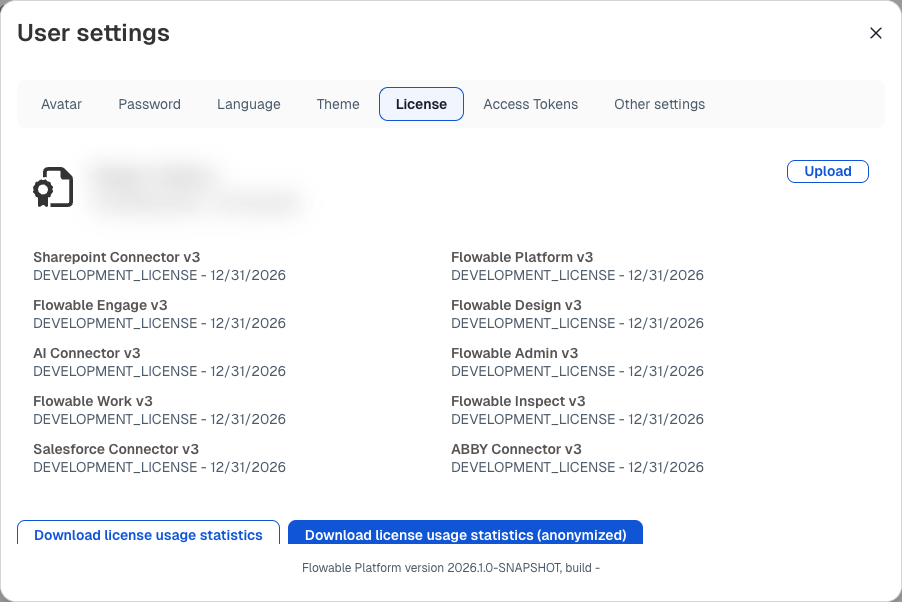 Download buttons in Flowable Work > User Settings > License tab
infoIn order to access the License tab within User Settings, the User Definition must include the accessLicense flag in the allowedFeature list.
Over-limit banner
When usage exceeds a licensed limit — or when no valid license is installed — Flowable Work shows a persistent banner at the top of the application. The banner names the metric that is over its limit and its utilization, and offers a Manage license shortcut. It stays visible until the situation is resolved.
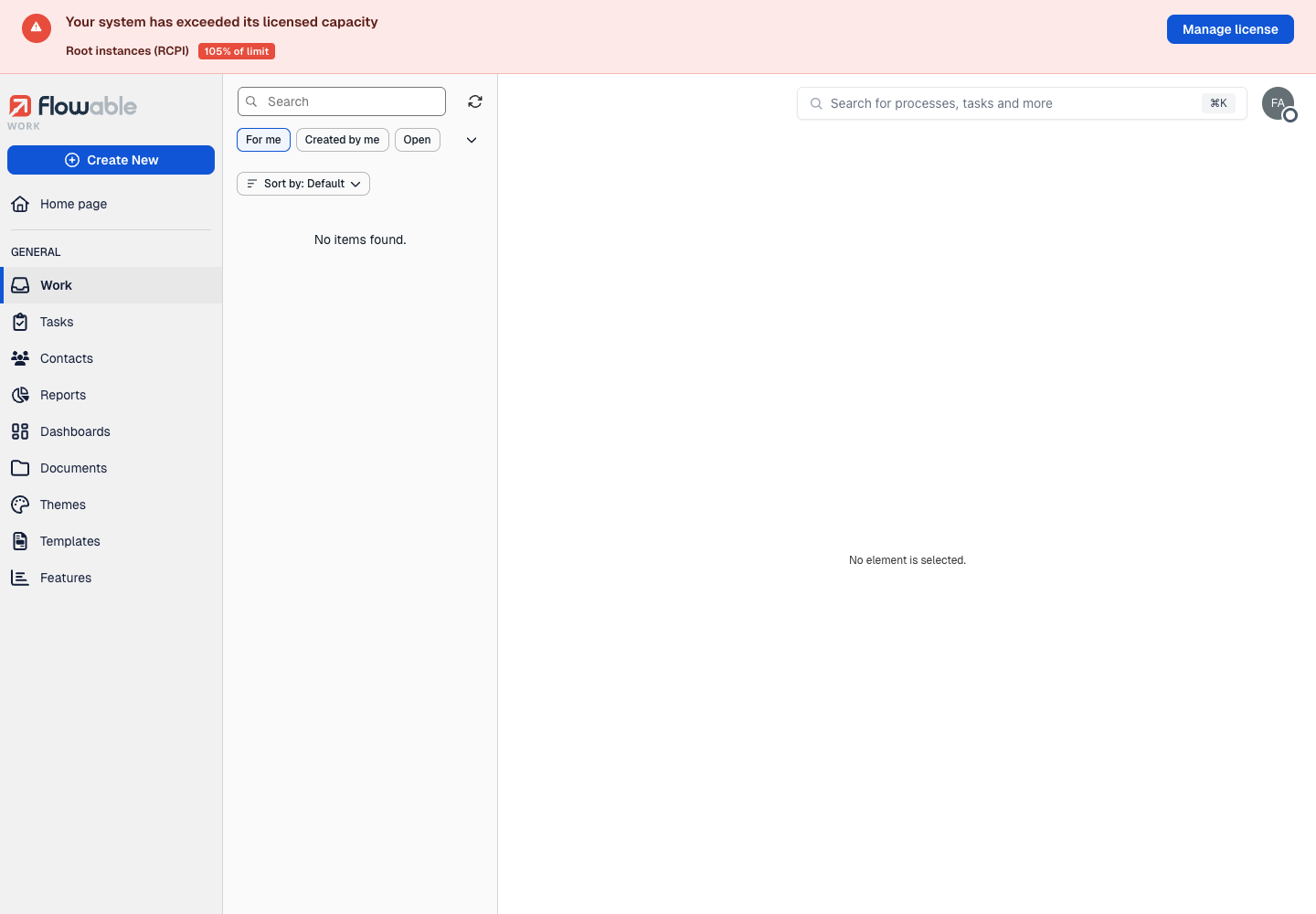 Over-limit compliance banner in Flowable Work
Download License Usage Statistics in Flowable Control
- In Flowable Control, open System Info > License info in the left-hand side menu.
- At the top right, click Download file to download the statistics.
The page opens on the Overview tab, which shows the overall compliance verdict, a card per licensed metric (Named users, Occasional users, Root instances (RCPI) and Agents) with its usage against the limit, a utilization chart, root instances over time, the user mix and cluster health.
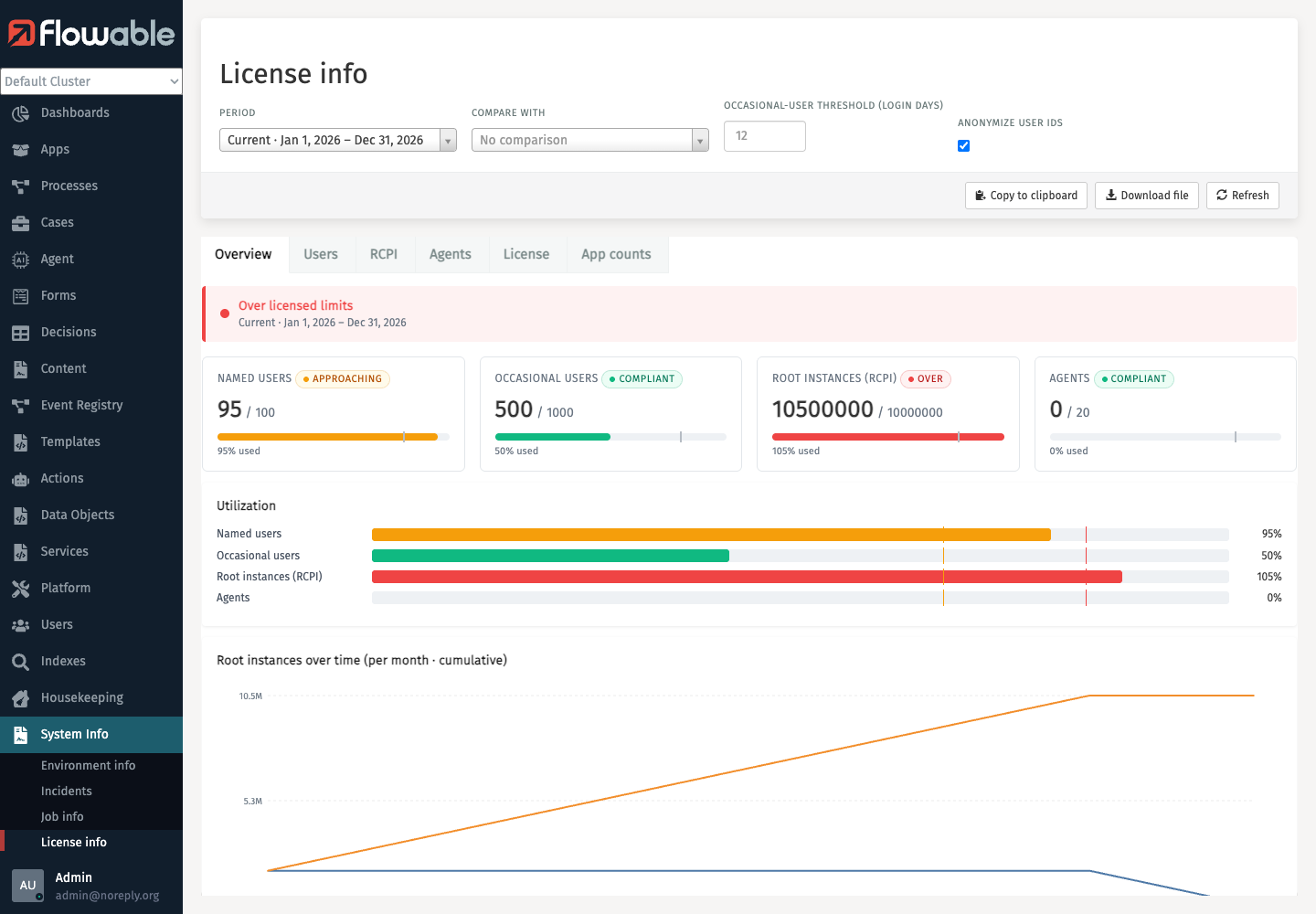 License info Overview tab in Flowable Control > System Info > License info
At the top of the page a set of controls apply to every tab:
- Period: the reporting period to display (the ongoing period is marked Current).
- Compare with: an optional second period whose values are shown as a delta next to the current ones.
- Occasional-user threshold (login days): the login-day threshold used to classify Named vs Occasional users.
- Anonymize user IDs: replaces usernames with anonymized identifiers. It's recommended to keep this enabled so the downloaded file does not contain any usernames or other information not required for the license check.
The dashboard is split into the following tabs:
- Overview: compliance verdict, per-metric usage cards, utilization, root instances over time, user mix and cluster health.
- Users: Named, Occasional and distinct-user counts, the user mix, the monthly distinct-user trend, and a searchable user-detail table showing each user's tenant, login days and classification.
- RCPI: root vs non-root instance counts, root instances over time, and instance counts that can be grouped by tenant, scope or instance type.
- Agents: the deployed-agents count, deployments by tenant, and a searchable list of agent definitions.
- License: the license summary (licensee, contact, issue date, generation timestamp, active nodes, store type), the licensed limits, the product licenses and cluster health.
- App counts: apps per tenant, model types per tenant, and a searchable list of apps with their definition counts.
The Users tab illustrates how the occasional-user threshold classifies each user:
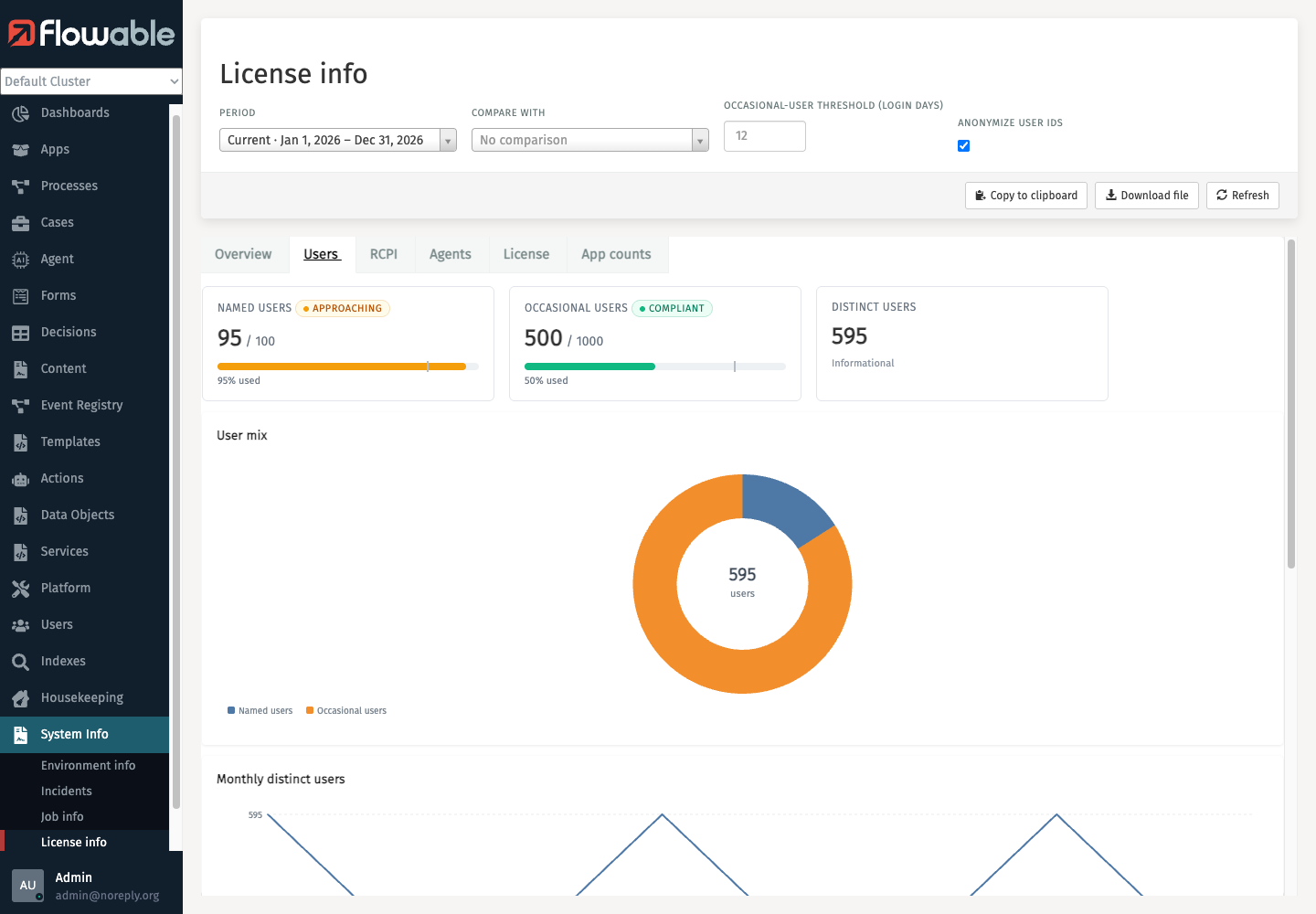 License info Users tab in Flowable Control
Download License Usage Statistics in Flowable Hub
- In Flowable Hub, open the environment (cluster) you want to inspect.
- In the left-hand side menu select System Info > License Info.
- At the top right, click Download JSON to download the statistics (use Copy JSON to copy it to the clipboard).
Flowable Hub presents the same License Info dashboard as Flowable Control, with the same tabs (Overview, Users, RCPI, Agents, License, App counts) and the same Period, Compare with, Occasional-user threshold and Anonymize users controls described above.
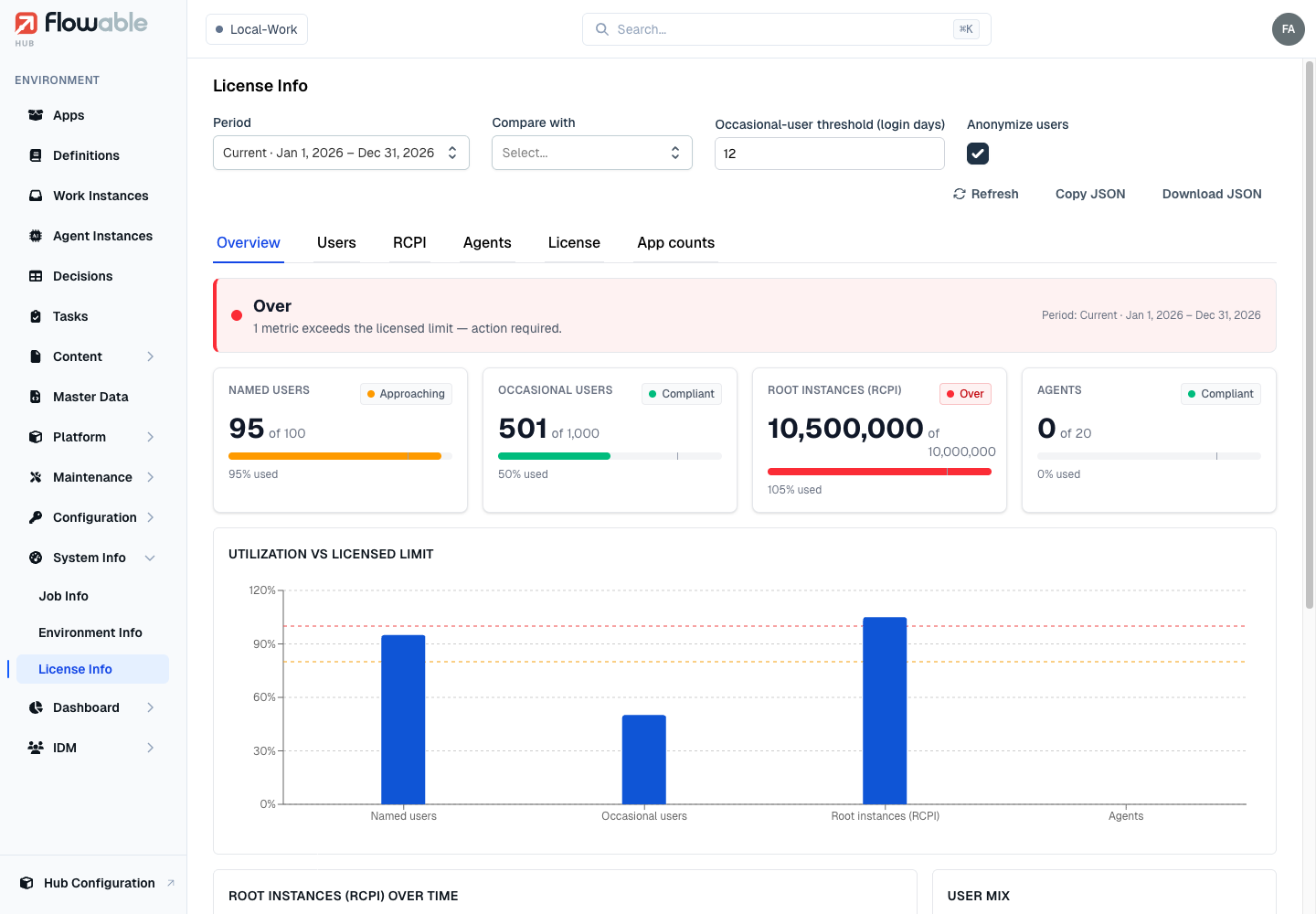 License Info Overview tab in Flowable Hub > Environment > System Info > License Info
Download License Usage Statistics via REST API
The License Usage Statistics can also be retrieved via REST API:
- Request URL:
http://{hostname}/core-api/license?anonymizeUserIds=true&includeValidationInfo=true - Parameter
includeValidationInfo=truemust be set to retrieve the required statistics. - It's recommended to use
anonymizeUserIds=trueparameter to get the anonymized version which does not contain any usernames or other information not required for the license check.
The response uses the period-aware export format described below and includes the computed compliance summary.
Content of the License Usage Statistics JSON File
The License Usage Statistics JSON file contains the following components reporting on the current usage of the Flowable environment:
- Product Licenses: This section lists the Flowable products that are enabled with your license.
- Compliance Status: A cached, high-level verdict (
complianceStatus) that lists the overall status and any metrics that currently exceed their licensed limit. This is the same information that drives the over-limit banner in Flowable Work. - Validation Info (
validationInfo,exportVersion2.0)- Limits: The licensed entitlement limits (Named users, Occasional users, RCPIs, Agents) and the occasional-user threshold. These are constant across periods.
- Compliance Summary: The overall compliance verdict across all periods, together with the list of metrics that are over their limit (issues) or approaching it (warnings).
- Periods: The per-period usage. Each period contains its start/end dates and, for that period:
- Users: the distinct-user count, the Named vs Occasional classification, the monthly login trend and per-user details (tenant, login days, classification).
- Instance Counts (RCPI): root and non-root instance counts, broken down by tenant, scope and instance type, plus a monthly breakdown.
- Definitions: deployed definition counts per definition type (for example agent definitions), used for the Agents and App counts views.
- App Counts: The number of deployed apps and models in the Flowable environment.
- Node Information: This section lists the number of active Flowable nodes in the environment. This is for comparing against licensed JVMs (if applicable).
- Validation Counts: A sample of raw instance-count rows with their individual signatures, used to validate the aggregated counts.
- Generation Timestamp: The timestamp at which the statistics were generated.
- Signature: The signature section at the bottom is a cryptographic signing function to ensure that License Usage Statistics data has not been altered.