Document Agent
The Document Agent is responsible for handling and processing content items in Flowable.
It enables AI-powered document classification and data extraction, typically in coordination with a case or process.
All operations for the Document Agent take a Content item as input and can produce various output types depending on configuration.
 When to use the Document Agent?
Use the Document Agent when your use case involves documents that need to be automatically classified or parsed for structured data, such as extracting metadata from invoices and other documents.
Key Features
- Automatically classifies documents into content models
- Supports
Content itemas input with flexible output types - Integrates with associated forms to generate output schemas
- Works standalone or as part of an Orchestrator Agent
- Supports a wide range of document formats, including emails and Microsoft Office files
Document Classification
Document classification is a default operation that enables you to classify a document into one of your defined content models.
To configure classification:
- Use the Add classification button to add candidate content models.
- For each classification, specify:
- The content model
- The default operation used for data extraction
When the Document Agent is part of an Orchestrator Agent, it will automatically classify documents attached to the case.
Once classified, the agent runs the Extract data operation to retrieve structured content and attaches the result as metadata on the content item.
You can configure which extraction logic to use via the Extract data option.
A built-in operation called Data extraction is provided, but custom operations are also supported.
Operations
Operations executed by the Document Agent follow the same structure described in the operations concept.
The input type is always a Content item.
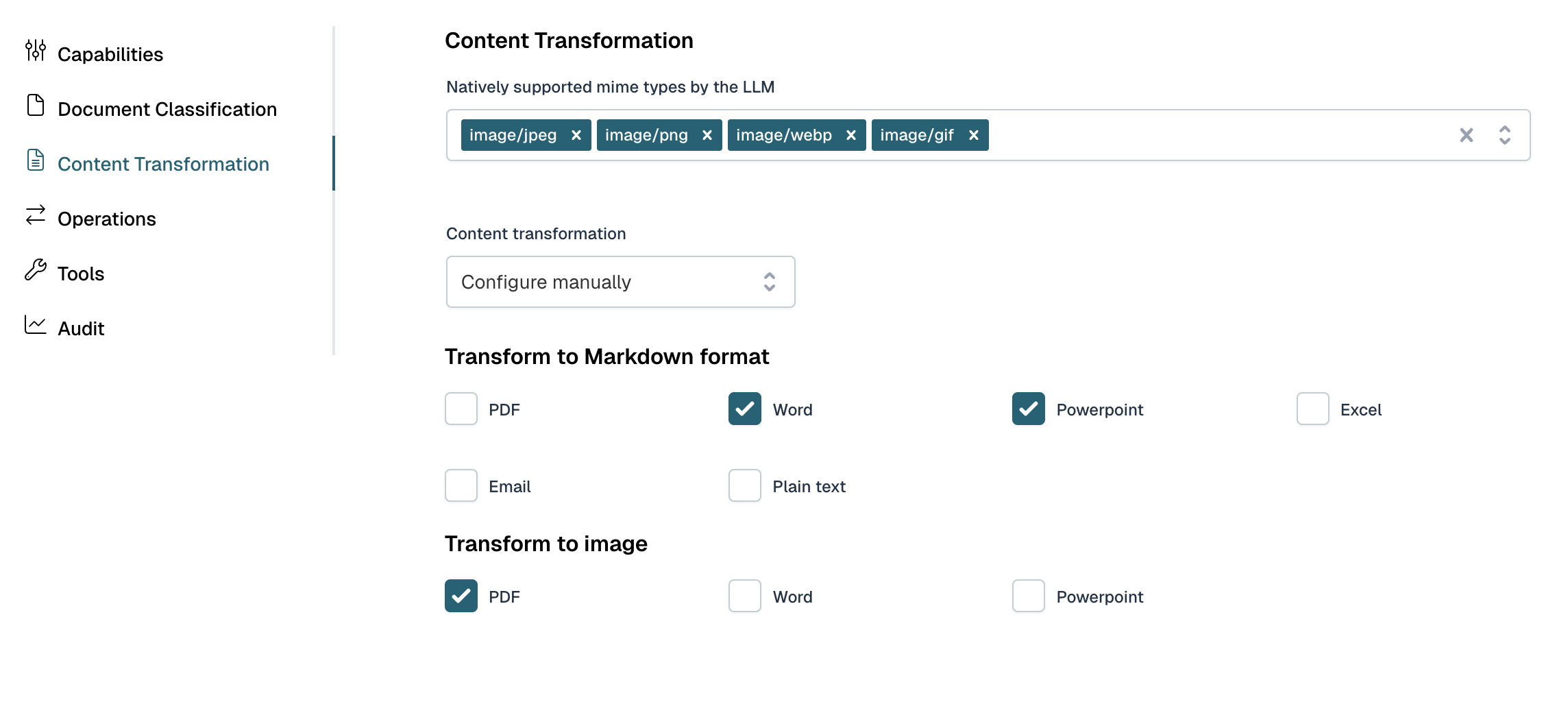
In the Content transformation tab the way content of content items can be configured specifically.
For example, certain LLM's don't support attaching certain document types directly. In these situations, the content can be passed by transforming it to Markdown or an image.
If so, the markdown or image and according prompt will be added automatically to the user prompt.
In versions 2025.1.x, the user prompt is not automatically changed.
Instead, the content of the content item is parsed to a markdown and can be accessed with ${text}.
Output Types
In addition to the default output type, the following output types are supported:
Data based on associated form:
This uses the content type of the input item to find a linked form for theCreateaction.
That form is parsed (on a best-effort basis) and used as the output schema for the operation.
Multi-document Support
Operations can be invoked with multiple documents in a single request. In this case, all documents are processed together by the LLM, and the output is returned once, as a combined or shared result.
Data Extraction
The default Data extraction operation can be used to retrieve structured data from a classified document, but it is optional.
You may also define custom operations that return structured outputs, these allow you to decouple the extraction schema from the associated form.
Flowable provides a default prompt for the Data extraction operation.
This prompt can be customized using either a Simple prompt or a Prompt template, giving you control over how data is extracted from the document.
Supported File Types
The Document Agent supports the following MIME types for conversion to text, which can then be classified and used for data extraction:
- Email files (
message/rfc822,application/vnd.ms-outlook) - Plain text files (
text/plain) - Markdown files (
text/markdown) - Microsoft Word documents (
application/vnd.openxmlformats-officedocument.wordprocessingml.document) - Microsoft Excel spreadsheets (
application/vnd.openxmlformats-officedocument.spreadsheetml.sheet) - Microsoft PowerPoint presentations (
application/vnd.openxmlformats-officedocument.presentationml.presentation) - PDF (
application/pdf)
Different LLMs have varying levels of native support for document types. While some models can process PDFs, Word documents, or spreadsheets directly, others may have limitations or lack built-in support for certain formats.
Some LLMs deliver very good results—or even better performance when documents are converted to images before processing. This approach can be particularly effective for documents with complex layouts, tables, or visual elements, as vision-capable models can interpret the document holistically rather than relying solely on extracted text.
Most LLMs have excellent support for markdown format. Converting documents to markdown often provides clean, well-structured text that models can easily understand and work with, making it a reliable choice for text-heavy documents.
Flowable allows you to configure how documents are transformed before being sent to the LLM through the Content transformation tab. This gives you control over the conversion strategy based on your document types and the capabilities of your chosen LLM, ensuring optimal results for your specific use case.
Summary
- The Document Agent classifies documents and extracts structured data from
Content items. - Multiple files can be processed in one request.
- Common file types like emails, text, and Office documents are supported.
- Often used alongside the Orchestrator Agent in case workflows.