Multi-Instance and Variable Aggregation
Introduction
In a BPMN process, you often need to repeat an activity multiple times — for example, sending a review task to multiple reviewers, processing a batch of items, or collecting approvals from a group of people. BPMN multi-instance allows a single activity definition to execute multiple times, either in parallel or sequentially.
Variable aggregation extends this by automatically collecting data from each instance into a single aggregated variable on the parent scope. Without variable aggregation, you would need to manually manage variables using execution listeners and propagation logic.
Multi-Instance Basics
Multi-instance can be applied to most BPMN activities: user tasks, service tasks, call activities, and subprocesses. It creates one instance per element in a collection (or a fixed number of times).
Parallel vs Sequential
Parallel multi-instance creates all instances at once. Each instance runs concurrently and independently. This is ideal when reviewers can work at the same time without depending on each other.
Sequential multi-instance creates instances one at a time. The next instance only starts after the current one completes.
Configuring Multi-Instance in Flowable Design
To configure multi-instance on an activity, select the activity in the BPMN editor and open the Multi instance section in the properties panel. The following properties are available:
| Property | Description |
|---|---|
| Multi instance type | None, Parallel, or Sequential |
| Collection | An expression resolving to the list to iterate over (e.g., ${reviewers} or ${root.approvers}) |
| Element variable | The variable name under which the current element is available within each instance (e.g., reviewer) |
| Element index variable | The zero-based index of the current instance (defaults to loopCounter) |
| Completion condition | An optional expression to terminate early (e.g., ${nrOfCompletedInstances >= 3}) |
Built-in Loop Variables
The engine automatically maintains the following variables on the root execution:
| Variable | Description |
|---|---|
nrOfInstances | Total number of instances |
nrOfActiveInstances | Number of currently executing instances |
nrOfCompletedInstances | Number of completed instances |
loopCounter | Zero-based index of the current instance (on each child execution) |
Multi-Instance with a Call Activity
A common pattern is to use multi-instance on a call activity to start a subprocess for each element in a collection. For example, a review process where each reviewer gets their own subprocess instance.
To configure this:
- Add a call activity to your process and reference the subprocess
- Set the Multi instance type to
Parallel - Set the Collection to the list of items (e.g.,
${root.approvers}) - Set the Element variable (e.g.,
approver) - Configure In variable mappings to pass data into each subprocess
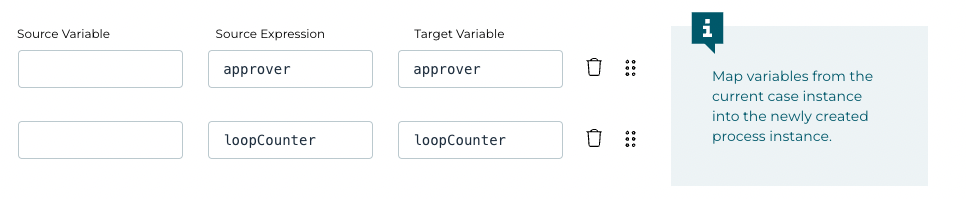
Within the subprocess, the element variable is available to set the assignee dynamically. For example, setting the user task assignee to ${approver.approverId}.
Variable Aggregation
Variable aggregation collects data from each multi-instance execution into a single result variable on the parent scope. This is configured in the Variable Aggregations section of the multi-instance properties.
How It Works
Aggregation happens in two phases:
-
Single instance completion: When each child instance completes, the engine extracts the configured source variables and stores them temporarily with a special scope.
-
All instances complete: When all instances finish, the engine collects all temporary results, sorts them by index to maintain order, produces the final aggregated variable (a JSON array by default), stores it on the parent scope, and removes the temporary variables.
Configuring Variable Aggregations
In the Variable Aggregations section of the multi-instance properties, you can define:
| Property | Description |
|---|---|
| Target variable | The name of the output variable where aggregated results will be stored (e.g., reviews) |
| Variable definitions | A mapping of source variables to target fields |
Each variable definition specifies:
- Source: The variable name or expression from each instance (e.g.,
score,comment, or${score * reviewer.scoreWeight / 100}for computed values) - Target: The destination field name in the aggregated result (optional if the same as source)
Overview Variable
By default, the aggregated variable is only available after all instances complete. However, you can enable the Create overview variable option, which creates a variable at the start that updates incrementally as each instance completes. This allows you to see partial results while the multi-instance is still running — useful for dashboards or monitoring.
Important Behavior Change
When variable aggregations are configured, variables stored on a task are stored locally on the multi-instance root execution rather than on the process instance. Only data specified in the aggregation definitions is retained after the multi-instance completes; all other variables are discarded.
Using Multi-Instance with Forms
Binding Form Fields to Collection Elements
When a multi-instance user task has a form, you can bind form fields to the current element in the collection using the loopCounter variable as an index:
{{root.approvers[loopCounter].reviewDecision}}— binds to the review decision for the current reviewer{{root.approvers[loopCounter].reviewComments}}— binds to the review comments for the current reviewer
The root prefix is needed to access the collection on the case or process root level. The loopCounter provides the index of the current multi-instance iteration.
Conditional Field Requirements
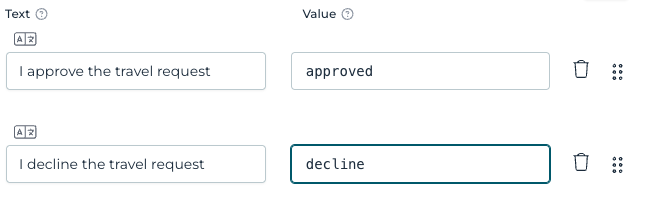
You can make form fields conditionally required based on the review decision. For example, making a comment field required only when a reviewer declines:
Set the Required expression of the comment field to:
{{root.approvers[loopCounter].reviewDecision == 'declined'}}
Collecting Results from Each Instance
To collect a combined result from all instances (such as an overall approval flag), you can use an Initialize Variables service task within the subprocess:
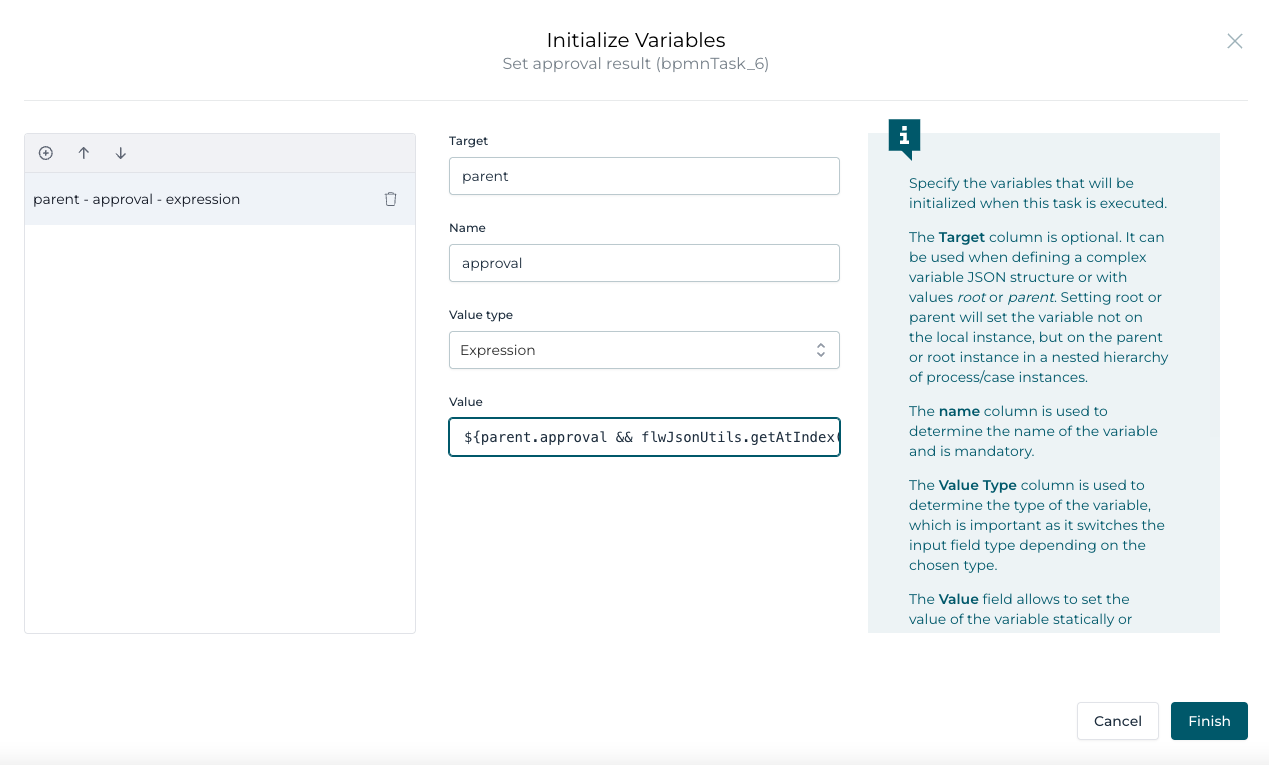
The expression ${parent.approval && flwJsonUtils.getAtIndex(root.approvers, loopCounter).reviewDecision == 'approved'} combines the previous approval state with the current reviewer's decision. The parent prefix targets the parent process instance.
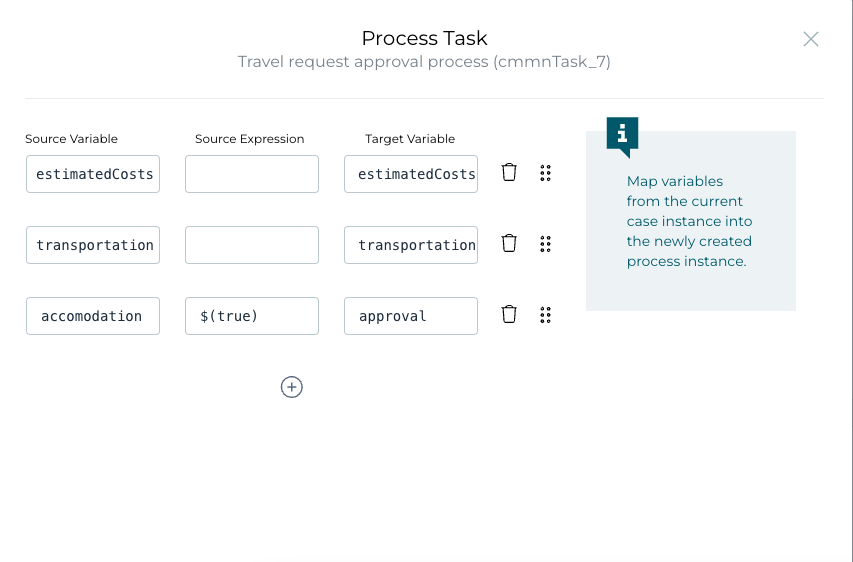
Initialize the approval variable to true in the In variable mappings of the call activity:
And map the result back with Out variable mappings:

Displaying Aggregated Results
After the multi-instance completes, the aggregated data can be displayed in a form using a multi-entry Subform component:
- Add a
Container > Subformcomponent to your form - Set
Store subform data in single variableto the aggregated collection (e.g.,{{approvers}}) - Check
Multiple elementsto render one subform per collection element - Uncheck
Show add buttonandShow remove buttonfor read-only display - Uncheck
Enabledto make it read-only - Set
Ignoredto an expression like{{!(approvers[0].approverId)}}so it only shows when data exists
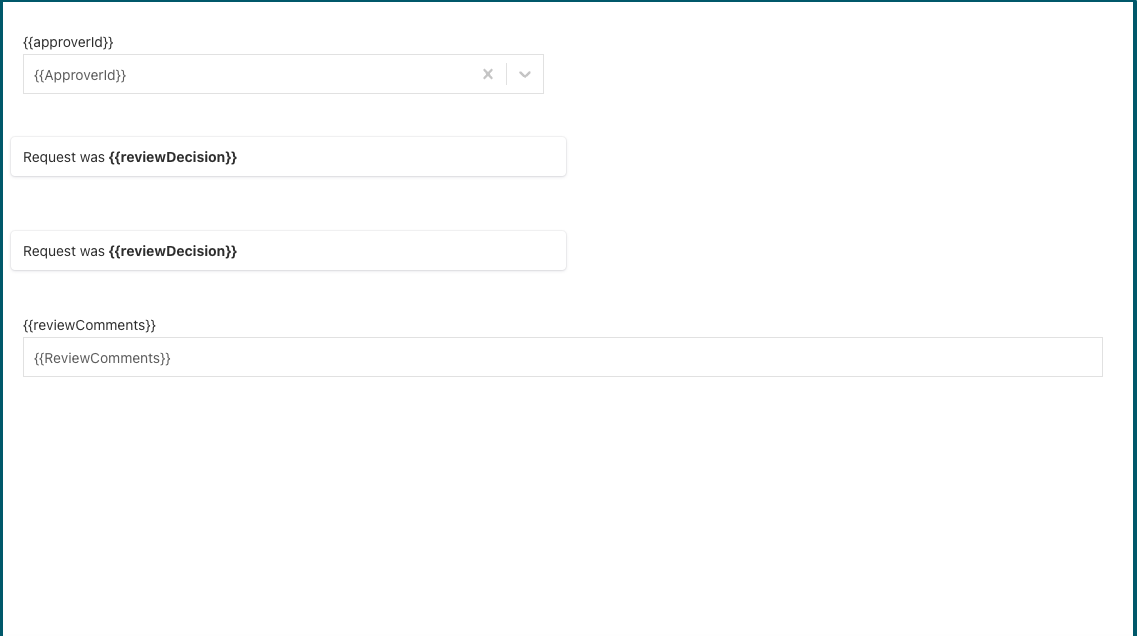
Within the subform, add display components bound to the element fields, such as the reviewer name, decision result, and comments:
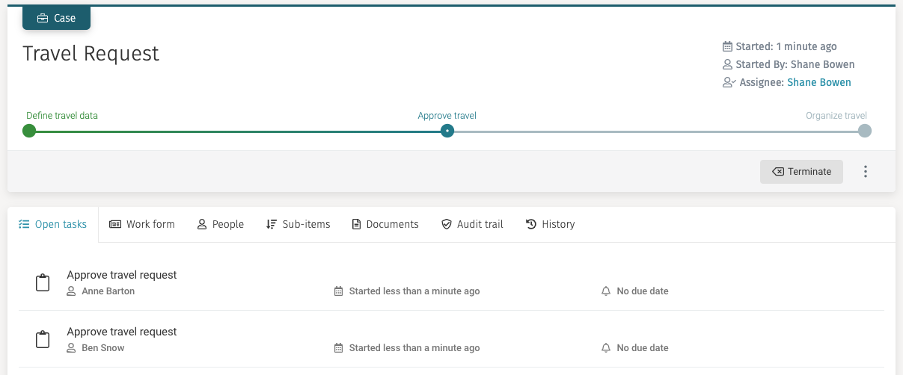
The runtime result shows the parallel approval tasks assigned to the selected reviewers:
Further Reading
For a complete step-by-step tutorial that builds a multi-instance approval process from scratch, see Part 2: Make the Approval Process Multi-instance.