Audit
Introduction
Flowable creates a technical audit trail (history) by default. When it is required to have a business audit trail, the audit task is the easiest way to do this.
The audit stream is created using audit instances (audit entries) being added for whatever reason. Those audit entries are later queried using filtering aspects like the scope, type, or user depending on the needs and angles to look into auditing.
The Audit Instance
Scoping and Permissions
An audit instance should always be scoped to a context it belongs to. Although the builder API does not explicitly enforce it to be set, it is a good practice to always include a scope to an audit entry. It might even be something like scope type global and any scope ID you like, but scoping is usually the key for permissions and filtering, so a very important concept.
There are a couple of predefined scope types you can create audit entries for like cmmn or bpmn for the scope of a case or process, respectively. More scope types include task, conversation, user or user-account.
It does not stop there, you can add your own scope types as well as client or claim or whatever you need to build a stream for later on. Another example might be to save audit entries whenever some important settings are changed like setting some thresholds or escalation settings, changing an SLA and the like. You might want to use scope type settings there, and the scope ID would point to the exact setting which was changed.
The scope type and scope ID are always used together. The scope type defines the type of object or context the audit instance is bound to, and the scope ID references the exact object. As an example, you might use scope type cmmn and the scope ID contains the case instance id to bind an audit entry to a particular case instance.
The scope is typically used for permission handling as well when retrieving audit entries. The permission to see the audit entry is derived from its scope by default. If you created an audit instance scoped to a case instance, you need to have access to the case itself to also gain access to the audit entries scoped with it.
When you use the default audit REST endpoint to filter audit entries, there are only a few permission handlers yet available to make sure you only get the entries you are allowed to see, furthermore, the scope always needs to be present for a query, so it is meant to be used for scoped audit streams only using the built-in handlers like for cases, processes and tasks as an example.
When you build your own custom scopes or want to create an audit stream within another context than a single scope, you need to create your own REST endpoint for that by using the Java query API internally.
 note
noteIf you create your own REST endpoint to query for audit entries, always think about the permissions of the audit entries! Who is able to see what entry? What permissions do I need to check when querying for audit instances? Otherwise, you might leak classified information to be seen by users not entitled to see such information.
The sub scope ID is optional and further specifies the context of the audit instance. As an example you might use cmmn as the scope type and the case id as the scope ID and use a task id as the sub scope ID to bind the audit entry to the case as its main scope, but also point out that it was created in the context of a particular task within the case.
You can optionally also set the scope definition ID to the scoped object model for instance. This way you might later filter for all entries created within a specific type of case model.
Type and Sub Type
Beyond the scope you can define the type and sub type for an audit entry. Most likely it is used for later filtering so be careful and think about the requirements for the audit stream you need to query and render to set appropriate type information.
Using an example for approvals, building just an approval audit stream in a dashboard where you want to see everything around approvals, no matter the case or user, just approvals. Then you could set the type to approval and use approved or declined as subtypes for instance.
noteAlthough the type and subType are custom fields for an audit entry, there are some predefined ones used in the audit view on a case or process like create or complete where if known, another icon is rendered for the entry according the type.
Message and category properties
2026.1.0+The audit Message and Category are now standalone properties of the audit task, configured directly in its property panel. Previously they could only be provided as the message and category keys inside the payload.
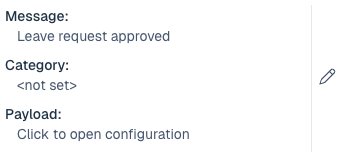
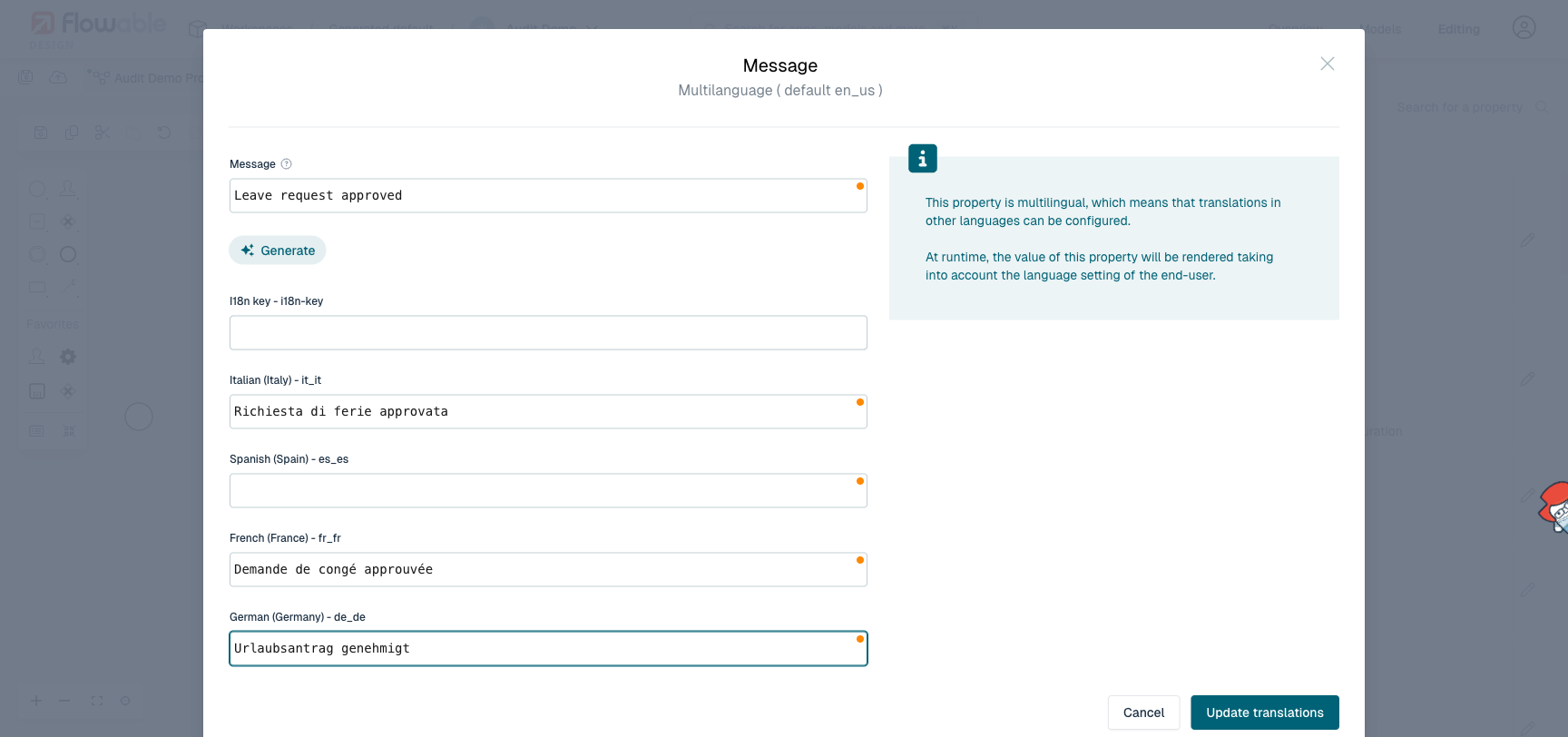
The Message can also be defined in multiple languages. Open the multilanguage editor on the Message field to provide the message per language. At runtime the default audit trail renders the message in the viewing user's language.
Payload
The payload is optional and might contain additional information for the audit entry. You can add an arbitrary number of additional data to the payload, there is no limitation, just keep the overall data you produce through those audit entries in mind.
There are some predefined keys for the payload in order to be rendered in the default audit trail UI of a case or process (see above that this has changed starting from 2026.1.0):
message: the string added to the payload using this key is rendered as the content of the audit entry. It might as well be set in Design as an expression, as an example,${findUser(authenticatedUserId).displayName} has approved the request '${root.name}' with comment: ${comment}.would evaluate that string before it is set as the message in the payload of an audit entry.category: usesystemoruserto set the category for the audit entry to be rendered accordingly in the default audit UI.
Using the Audit Task in a Case
Simply create a new case model and add audit tasks to it:
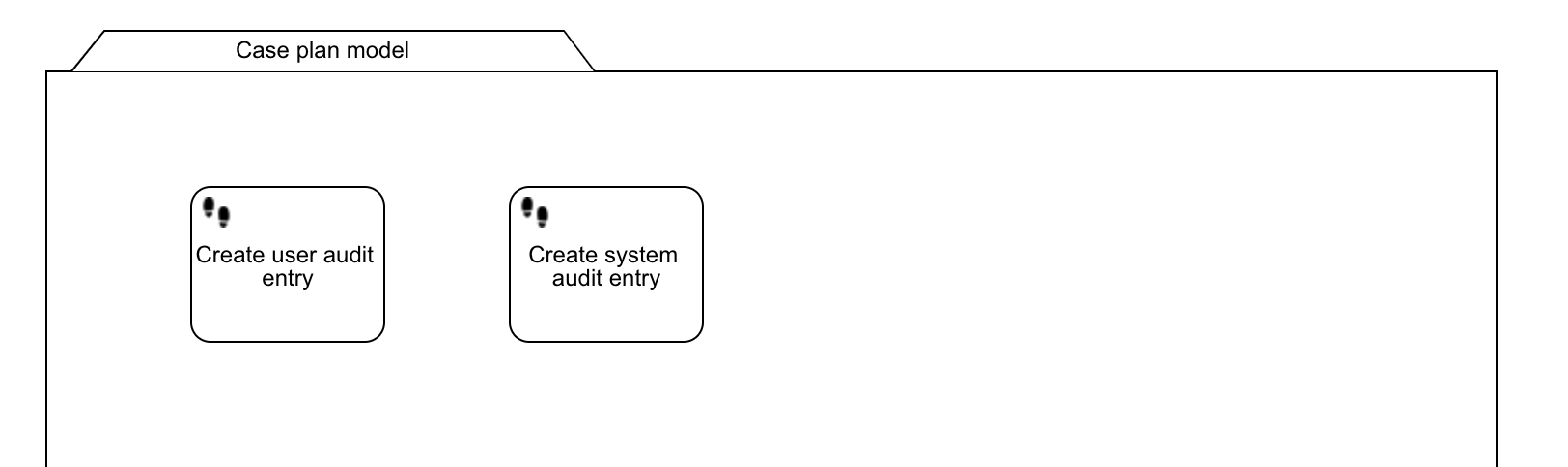
Here are the sample properties for both audit tasks:
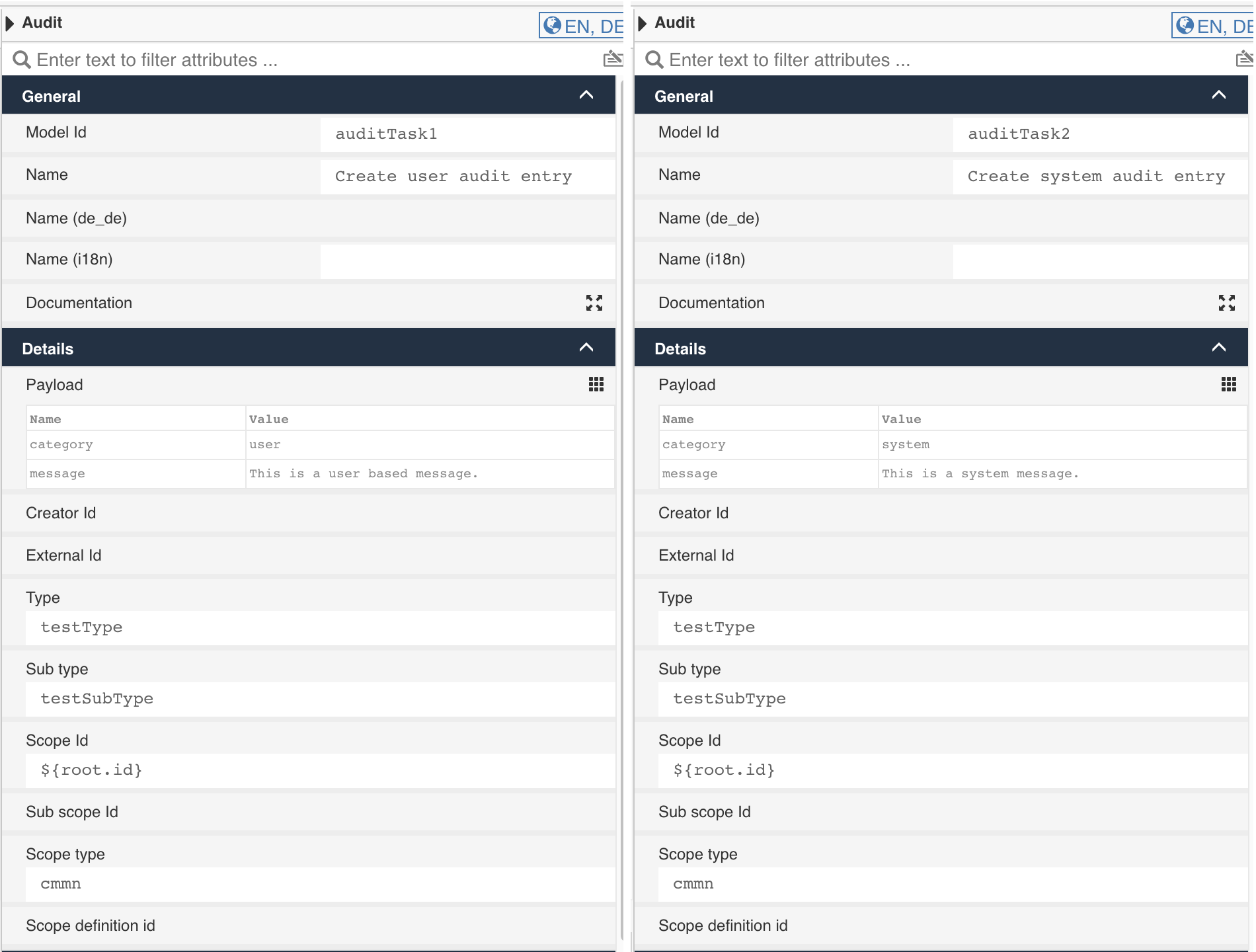
Audit Task Property Details
| Property | Description |
|---|---|
| Creator id | If left empty, the currently authenticated user is taken by default. But you can also enter an expression resolving to a user id, if you want the entry being created in the context of someone else. That might make sense if you run stuff asynchronously and want to make sure the correct user is entered here. |
| External id | This one is completely custom, so you can use it with whatever you want. It might point to an external important data object being changed, or any contextual reference or information you might want to use or filter the entries with. |
| Type | The type of the entry is custom, so you can use the type and sub type as you want. When defining type / sub type ask yourself what you want to filter for later on. |
| Sub type | The sub type gives more details about the type. As an example, you might want to use approval as the type, then the sub type further specifies the entry like approved or declined or timed out or delegated. |
| Scope ID | The scope ID contains the id of the context for the audit entry. For a case, use the case instance id. |
| Sub scope ID | The sub scope is optional and might further specify the scope / context for the entry, such as a task id. |
| Scope type | The type needs to define the object we reference using the scope ID, so scope ID and scope type identify the context for the audit entry and usually defines the permissions too. |
| Scope definition ID | The optional definition id or model key of the scoped object which can be used for filtering later on. |
| Payload | The payload is optional and might contain additional information. The message and category are predefined keywords used in the standard audit UI. |
| Payload / category | Default values for the category are user and system but you can use any custom one. |
| Payload / message | The message used in the default audit UI, might even contain an expression to be resolved when creating the audit entry. |
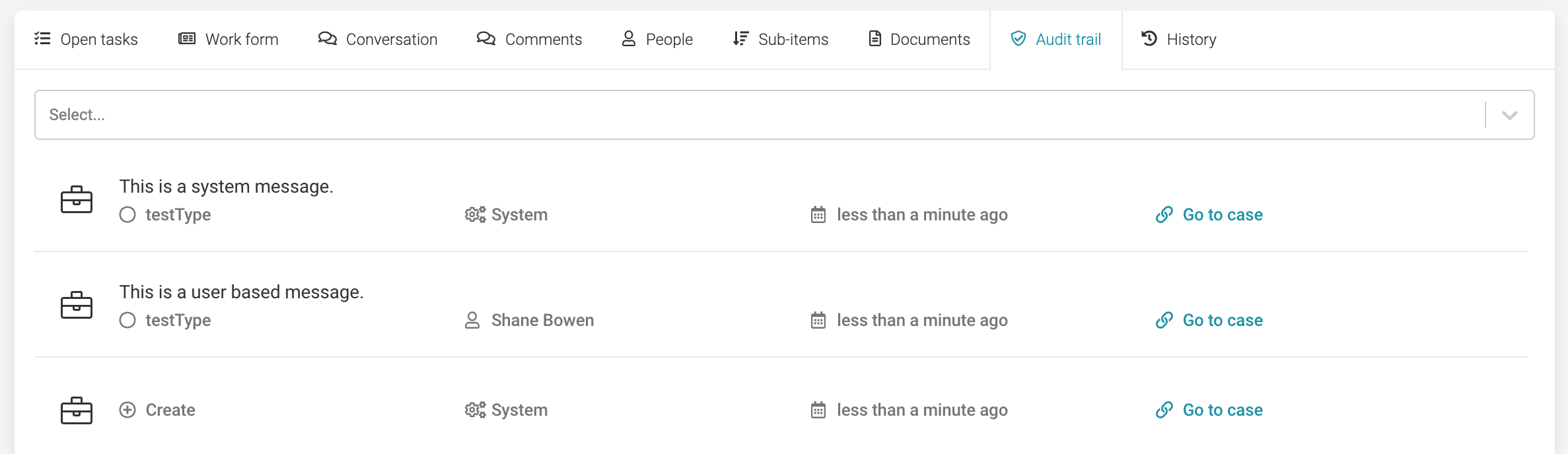
If you deploy a sample app and run such a case, this is how the audit entries get rendered in the default audit trail UI:
Java API
The Flowable audit capabilities are exposed to developers through the AuditService, which provides the following capabilities:
- Generate Audit Entries
- Query Audit Entries
- Update Audit Entries
- Delete Audit Entries
Properties
General
| Attribute | Type | Description | Category |
|---|---|---|---|
| Model Id | Text | Model Id identifies the element within the process model. | The model id, name and documentation properties can be found on any element. They are used respectively to uniquely identify the audit task, to give it a user-friendly name and to add a free-form description. |
| Name | Text | The name of the element. This is the name displayed in the diagram. | |
| Documentation | MarkdownMinimal | The documentation attribute additionally adds a description to the component. | |
| Message | Text | The audit log message. | The payload is optional and might contain additional information that is stored together with the audit instance. An arbitrary number of additional data can be added to the payload. |
| Category | Text with suggestions:
| The audit log category. | |
| Payload | List | The content of the audit log. | |
| Creator Id | Text | Creator id points to the creator who created audit log instance. If empty, default audit service creator is used. | Audit instances generated by the audit task are meant to be queries through the REST or Java API. Configuring the following identifiers will make filtering easier. Creator id: If left empty, the currently authenticated user is taken by default. An expression resolving to a user id can be set here, if the instance should be created in the context of someone else. That might make sense for example if executing asynchronously and wanting to make sure the correct user is entered. External id: this one is completely custom. |
| External Id | Text | External id points to the external system entity. | |
| Type | Text | The audit log type. | Audit instances generated by the audit task are meant to be queries through the REST or Java API. To allow for filtering, various types can be set. Type and Subtype are both custom properties. The subtype should give more details about the type, but it's fully customizable. |
| Sub type | Text | The audit log sub type. | |
| Scope Id | Text | Scope id points to the scope under which the audit task log is created. If all of scope attributes are empty, current scope is used. | Scoping is an important aspect of an audit instance. A scope points to the context it belongs to. This can be a process or case instance or anything else. Audit instances generated by the audit task are meant to be queried later on. Adding proper scope information makes querying easier. The Scope id, Subscope id, Scope type can be used to associate it with the current instance and task information. The Scope definition ID can be used to point to the corresponding process or case definition, or something completely custom. |
| Sub scope Id | Text | Sub scope id points to the sub scope under which the audit task log is created. If all of scope attributes are empty, current sub scope is used. | |
| Scope type | Text with suggestions:
| Scope type defines the type of the scope and sub scope instances. If all of scope attributes are empty, current scope type is used. | |
| Scope definition id | Text | Scope definition id points to the definition from which audit log was created. If all of scope attributes are empty, current scope definition id is used. |
AI
| Attribute | Type | Description | Category |
|---|---|---|---|
| AI Activated | Boolean | Make this element available within the context of an orchestrator agent. | These settings can be used when an orchestrator agent is linked to the case model. The flag AI Activated determines whether or not the agent will look at this particular plan item when evaluating which ones should be activated. The Activation type can be set to suggestion, in which case the agent will make a suggestion to the user (e.g. in the chat) if it deems this plan item needs to be activated, based on the case instance context. When using automatic, the agent will start the plan item itself, without user input. Lastly, the AI Instruction field allows to add specific instructions towards the agent. These will be added to the prompts when the agent is analyzing the current state. |
| Activation type | Selection:
| The type determines how this element will be activated by an orchestrator agent. Use 'Suggestion' when the agent should give advices and use 'Automatic' if the agent is allowed to complete elements itself without user interaction. | |
| AI instruction | TextArea | An AI instruction that provides additional instructions to the orchestrator agent. The more details here, the more applicable the responses will be. | |
| AI activation permission groups | Group Selection | Define the groups which have access to the AI activated suggestions. |
Control
| Attribute | Type | Description | Category |
|---|---|---|---|
| Required | Boolean | Select this option to mark the element as required (exclamation mark decorator). Required plan items must be either in the status COMPLETED, TERMINATED, or DISABLED in order for their parent stage to complete. | Check this option to mark this audit task as required, which means that it needs to be in a terminal state in order for its parent to complete. Visually, the audit task will get an exclamation mark icon. Required plan items must be in a terminal state (such as completed or terminated) in order for their parent stage to complete. |
| Completion neutral | Boolean | Completion neutral influences the plan item's parent stage completes. Plan items in the state AVAILABLE may prevent the parent stage (or case) from automatically completing. By checking this property, the plan item will behave neutral with respect to the completion of the parent container. | Completion neutral influences the plan item's parent stage completion. Normally, plan item instances in the state available may prevent the parent stage (or case) from automatically completing. By checking this property, the service task plan item will behave neutral with respect to the completion of the parent container (i.e. it will not stop the completion). |
| Manual activation | Boolean | Select this option to mark the element to have Manual activation (right arrow 'play' decorator). Plan items with Manual activation move from state AVAILABLE to state ENABLED once they trigger. A plan item in state ENABLED exposes an action button that allows the user to manually start the plan item. | A manual activated audit task is not automatically activated when its parent stage becomes active. Instead, the audit task plan item instance will be in the available state, until the user manually uses the action to activate it, at which point the custom logic is executed. |
| Manual activation name | Text | Define the name to be used for the manual activation trigger. | |
| Manual activation icon | Icon | Define the icon to be used for the manual activation trigger. | |
| Manual activation priority | Integer | The priority for the Manual activation action | |
| Manual activation permission groups | Group Selection | Define the groups which have access to the manual activation trigger. | Advanced configuration for manual activation. The permission groups allow to define which groups and the permissions users allow to define which users can use the action to manually activate the audit task plan item instance. |
| Manual activation permission users | User Selection | Define the users which have access to the manual activation trigger. | |
| Manual activation channels | Text | Define a list of channels to expose the manual activation action. | |
| Start form | Reference | An optional form shown when the event listener is manually activated. | The form that is shown when the action to manual activate the audit task is used. If there is no form, the audit task will immediately be activated. |
| In same deployment | Boolean | Set it to true if the referenced definition should be referenced from within the same app deployment. Set it to false to always use the newest definition. | The Same deployment flag is used to indicate that the manual activation form model that is used is part of the same app deployment package as where the current CMMN model is in. If unchecked, the latest version is used which can come from an app that is deployed at a later point in time. |
| Validate start form fields (server-side) | Boolean | If the start form is submitted and validate form fields expression evaluates to true, form fields are validated on the BE side according to the form model restrictions. | If the form is submitted and the flag or expression on the left-hand side evaluate to true, the form fields will be validated on the server-side according to the form model restrictions. |
Repetition
| Attribute | Type | Description | Category |
|---|---|---|---|
| Repetition | Boolean | Select this option to mark the element as repeatable (fencemark decorator). Repeatable plan items may exist more than once at run-time, each having their own life-cycle. | A audit task can be repeatable, in which case multiple plan item instances will be created for the same audit task plan item, creating multiple audit instances. The repetition can be an expression, and new instances are merged as long as the expression resolves to true. This can be limited using the Max instance count. The Repetition counter variable is a local variable with a value incremented by one for each new plan item instance merged. Alternatively, a Collection variable can be passed which leads to a plan item instance per element in the collection. The element can be captured in a variable using the Element variable and its index in the collection in the Element index variable. |
| Repetition counter variable | Text | Name of the repetition counter variable. | |
| Don't create repetition counter variable | Boolean | Enable this flag to prevent the creation of the repetition counter variable. When a variable aggregation is defined, this flag will be ignored and a repetition counter variable will be created. | |
| Max instance count | Selection:
| Defines the maximum number of instances for repetition. Note that this does not mean there can be only one instance ever in the lifetime of a case instance, this will limit the instances each time when the repetition is evaluated (for example when an entry sentry evaluates to true to re-enter a stage or plan item). | |
| Collection variable | Text | Variable to be used as the collection for the repetition. | |
| Element variable | Text | Variable that will be used to store the current item value for the repetition. | |
| Element index variable | Text | Variable that will be used to store the current index value for the repetition. | |
| Variable Aggregations | List | When having multiple instances of this audit task, there could be a need to create an aggregation of the variables merged and/or updated in each instance. With variable aggregation, a JSON variable can be merged that after all instances have been completed contains the summary of all the used variables. This is needed because typically variables are persisted locally, to avoid clashes on the process instance level. Alternatively, an 'overview' variable can be merged while the instances are still unfinished. Each aggregation consists of one or multiple definitions that map instance variables of one instance to the single aggregation variable. |
Advanced
Execution
| Attribute | Type | Description | Category |
|---|---|---|---|
| Impact on parent completion | Selection:
| Defines how the plan item is used when the parent completion evaluation is executed. | Normally, a parent stage completes when it has no active child plan item instances and all such instances are in a terminal state. Using auto complete, this can be changed to only look at the plan items marked as required. Using the Parent completion here, this behavior can be further specified: default will be as described above while ignore means that this service task isn't taking into account when checking if the parent stage completes. The other options allow for even finer-grained control to determine when to ignore this service task with regards to parent stage completion. |
| Asynchronous | Boolean | When enabled, the behavior of the plan item will be executed as an asynchronous job. This will happen when the plan item transitions to the ACTIVE state. During the execution of the behavior, the plan item will be set to an intermediate ASYNC_ACTIVE state. Please refer to the documentation for more details. | When making the audit task asynchronous, the audit instance will be created in the background. This is useful for example to not block the UI of a user, however creating such entry typically doesn't take much time. Choose exclusive to avoid other asynchronous steps of this process instance to run at the same time. When Leave asynchronously is enabled, the activity will be left as an asynchronous job. This means that the activity is ended asynchronously. |
| Exclusive | Boolean | Determines whether the plan item is run as an exclusive job. An exclusive job makes sure that no other asynchronous exclusive plan items within the same case instance are performed at the same time. This helps to prevent failing jobs in concurrent scenarios. | |
| Leave asynchronously | Boolean | When enabled, the leaving of the plan item will be executed as an asynchronous job. This will happen when the plan item transitions moved out of the ACTIVE state. During the execution of the behavior, the plan item will be set to an intermediate ASYNC_ACTIVE_LEAVE state. Please refer to the documentation for more details. | |
| Leave exclusive | Boolean | Determines whether the activity should leave as an exclusive job. An exclusive job makes sure that no other asynchronous exclusive activities within the same process are performed at the same time. This helps to prevent failing jobs in concurrent scenarios. | |
| Job Category | Text | When set, the underlying generated job will have a Job Category, which will be executed only by Application Servers, where the Case Engine has enabledJobCategories set to this category. | |
| Include in history | Boolean | When the history level is set to "instance" or "task" level with this property it can be configured if this plan item instance should be included in the historic plan item instance data. | The Include in history flag can be used to store the historical entry of this audit task when running with a history level that normally would not store the execution of the plan item. Note that this flag has no effect when running with history level 'none'. |
Listeners
| Attribute | Type | Description | Category |
|---|---|---|---|
| Lifecycle listeners | List | Allows you to define lifecycle listeners for a plan item. Lifecycle listeners allow you to execute an expression, a delegate expression or a class when a plan item transitions from one state to another. | With lifecycle listeners it is possible to react to state changes of the audit task. Lifecycle listeners allow you to execute an expression, a delegate expression or a class when the service task transitions from one state to another. |
Reactivation
| Attribute | Type | Description | Category |
|---|---|---|---|
| Direct activation condition | Boolean | Condition that expresses if the plan item should be directly activated when a case instance is reactivated. | Case reactivation is the the ability to reopen a finished case instance and continue with its execution. Case reactivation needs to be modeled using a reactivation listener and specific behavior can be configured for each plan item in the case model. The Direct Activation Condition is the first condition to be evaluated during case reactivation. If checked or if there is an expression evaluating to true, the audit task immediately gets activated, regardless of any entry sentry or condition which might be necessary to restart at a certain state of the case (e.g. a stage). The Ignore Condition, if checked or if there is an expression evaluating to true, means that the audit task is ignored on reactivation. The Default Condition only gets evaluated, if the previous ones are either not checked or evaluated to false. If so, the audit task behaves like a regular one as if the case instance was started from scratch. This means that any necessary entry sentry is considered and evaluated and the engine proceeds as normal. Please check the Flowable documentation for more details. |
| Ignore condition | Boolean | Condition that expresses if the plan item should be ignored when a case instance is reactivated. | |
| Default condition | Boolean | Condition that expresses if the plan item should trigger when a case instance is reactivated. |
Visual
| Attribute | Type | Description | Category |
|---|---|---|---|
| Font size | Selection:
| The font size of the element in the diagram. | Visual properties that determine how the audit task is shown in the diagram. This has no impact on the runtime execution. |
| Font weight | Selection:
| The font weight of the element in the diagram. | |
| Font style | Selection:
| The font style of the element in the diagram. | |
| Font color | Color | The font color of the element in the diagram. | |
| Background color | Color | The background color of the element in the diagram. | |
| Border color | Color | The border color of the element in the diagram. |
List Attribute Details
Payload
| Attribute | Type | Description |
|---|---|---|
| Name | Text | The name of the element. This is the name displayed in the diagram. |
| Value | Text | Value. |
Variable Aggregations
| Attribute | Type | Description |
|---|---|---|
| Target (Variable / Expression) | Text | The name of the target variable or an expression that gives the variable name |
| Type | Selection:
| The audit log type. |
| Delegate Expression | Text | Delegate Expression to be executed when the task is activated. A delegate expression must resolve to a Java object, for instance a Spring bean. The object's class must implement either PlanItemJavaDelegate or CmmnActivityBehavior. |
| Class | String | Fully qualified classname of a class to be invoked when executing the task. The class must implement either PlanItemJavaDelegate or CmmnActivityBehavior. |
| Target variable creation | Selection:
| |
| Variable Definitions | BasicFormList |
Variable Definitions
| Attribute | Type | Description |
|---|---|---|
| Source (Variable / Expression) | Text | The name of the source variable or an expression that provides the value |
| Target (Variable / Expression) | Text | The name of the target variable or an expression that gives the variable name |
Lifecycle listeners
| Attribute | Type | Description |
|---|---|---|
| Source state | Selection:
| |
| Target state | Selection:
| |
| Class | Text | Fully qualified classname of a class to be invoked when executing the task. The class must implement either PlanItemJavaDelegate or CmmnActivityBehavior. |
| Expression | Text | JUEL Expression to be executed when the task is started. Expressions allow you to interact with the backend by calling services, making calculations etc. You can find more information about expressions in the documentation. |
| Delegate expression | Text |