Reactivate Event Listener
Introduction
A case instance moved to the history (archive) when finished cannot be reopened by default. With the case reactivation functionality, you have the ability to regularly finish a case and move it away from the runtime to the history, and still be able to reactivate it at any later time, should you want to reopen it and continue with its execution.
Adding a reactivation listener to a case model allows a finished (archived) case instance to be reactivated (reopened). What reactivation actually means is fully up to the modeler as there might be different possibilities what should happen when a case instance is reactivated.
Let's imagine a sample case with three stages; data collection, review for approval and execution. Reactivating a finished case instance might be done in several ways: maybe you only want to redo the execution part of the case again, maybe you want to go back further and even redo the review and approval phase, or even restart the case from the data collection stage.
That's why reactivation needs further information in the case model to actually work — there is no general "just reactivate my case again". You need to add modeling information around case reactivation for it to work as required.
It all starts with the reactivate listener. Without it, you can't reopen a case instance. Adding a reactivate listener marks the case model to support case reactivation:
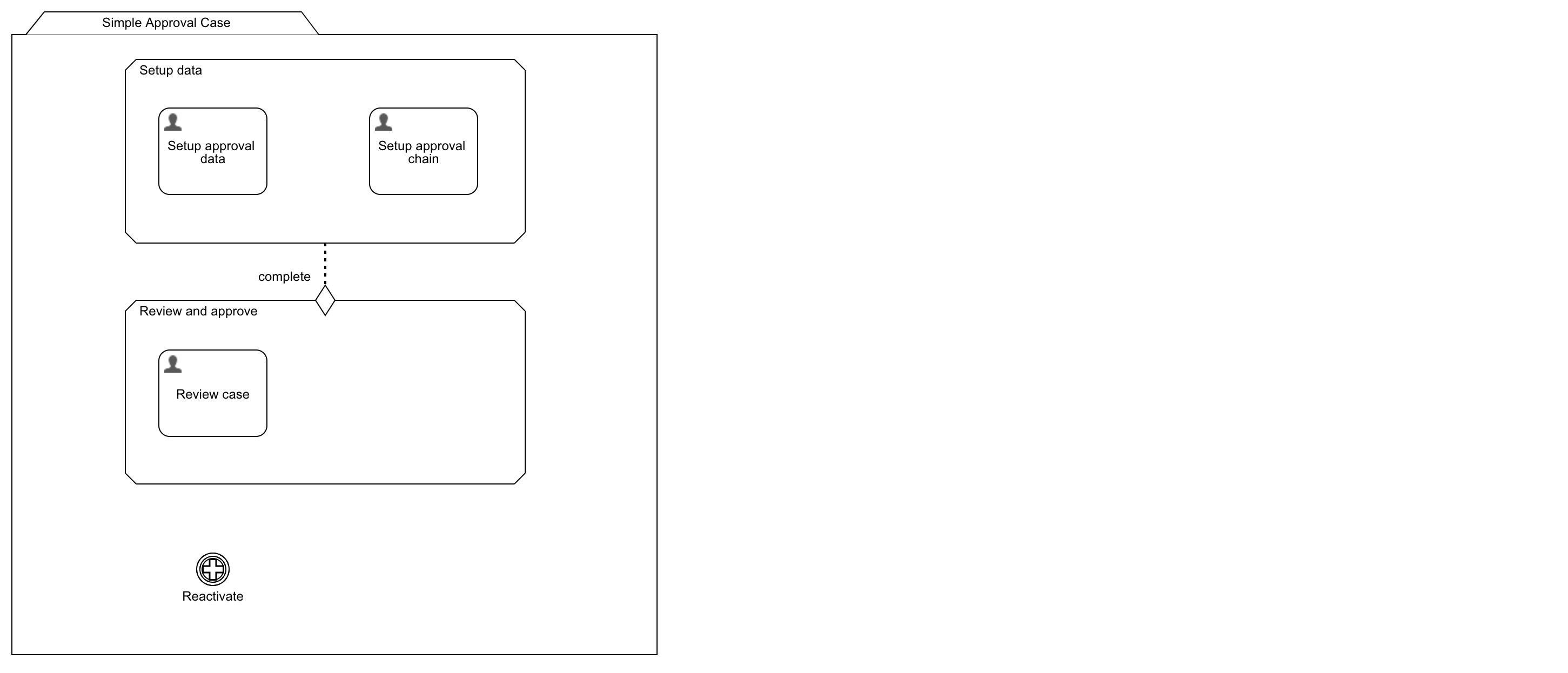
If you simply add a case reactivate listener to a case model and you don't do anything else, the case behaves exactly the same when reactivated as if it was newly started, with the only difference that it obviously keeps all of its data — especially variables which might have an impact on case execution like activating sentries or conditions leading to plan items being executed or not.
Most likely you don't want this default behavior and need a more fine-grained way of controlling what has to be re-executed when you reopen the case.
Reactivation Modelling Modes
Case reactivation can be modeled in two ways: inclusive or exclusive.
- Inclusive means by default, all plan items are going to be reactivated, and you would have to explicitly mark them to be ignored if they should not become active again.
- Exclusive is the opposite and means by default, none of the plan items are reactivated, and you would have to explicitly mark them to be activated, should they become active again.
Depending on your reactivation use-case one or the other is easier to model. If most of the case is being reactivated, use the inclusive mode. If only a small part is to be reactivated, use the exclusive mode.
You can define the default reactivation behavior for all plan items in a case model in the reactivation listener's Default plan item reactivation section. It contains the same reactivation rules and expression possibilities as on each plan item. If a plan item does not explicitly define reactivation rules, then the ones defined in the reactivation listener are used instead.
If there are none defined on the listener either, the basic default behavior is inclusive, which means the case is reactivated exactly the same way as if it was newly started, but keeps its data.
You can make it dynamic by using expressions for the default rules defined in the reactivation event listener.
How Case Reactivation Works
Case reactivation happens in two phases once you trigger the reactivate listener on an archived case.
Phase One
First, the case engine activates and executes all directly associated plan items of the reactivate listener. This can be achieved when using the complete event of the reactivate listener in combination with an entry sentry on a plan item.
You might want to reset some data or initialize variables before the actual case reactivation takes place using a variable initialize task or even using a service you invoke during phase one.
Phase Two
Once those primary plan items have been activated and executed, the case engine reactivates all plan items in the case according to their reactivation rules. It is basically the very same mechanism as if you would start a new case instance from scratch, with the only difference that you can have an impact on how plan items get treated during reactivation using the reactivation rules.
Reactivation Rules
Every plan item, including stages, supports reactivation rules where you can specify how the case engine should treat them once the case gets reactivated in phase two.
In a reactivated case, you often want to treat plan items differently from how they are designed to execute when starting a new case instance. Maybe you only want to re-execute a certain part of the case model, maybe it needs to be dynamic — depending on what to achieve with case reactivation, some stages or others need to be reactivated.
You can achieve all that using the plan item's reactivation rules, which support expressions to make it dynamic.
There are three types of reactivation rules, and they are evaluated in a fixed order:
Direct Activation Condition
This is the first condition to be evaluated during case reactivation. If set to true or if there is an expression evaluating to true, that plan item immediately gets activated, regardless of any entry sentry or condition.
Using this condition helps you to directly reactivate certain stages or plan items for case reactivation regardless of their entry sentries and further conditions.
Ignore Condition
If set to true or evaluating to true, the plan item having this rule is ignored when the case is reactivated and hence cannot be part of the execution again. Even if it has an entry sentry which would later activate it (e.g. when a linked stage is finished), it will not be activated again.
This condition helps you to prevent any plan item or full stage from being re-executed in a reactivated case, no matter their entry sentries or conditions.
Default Condition
This is the last of the three conditions and only gets evaluated if the previous ones are either not set or evaluated to false. If you set this one to true or it is an expression evaluating to true, that plan item behaves like a regular one as if the case instance was started from scratch. This means that any necessary entry sentry is considered and evaluated and the engine proceeds as normal.
Evaluation Order
The evaluation of those rules and conditions take place in the following order:
- First, the direct activation condition is evaluated and if true, the plan item immediately gets activated, and the other rules are ignored. This also happens even if the plan item has entry sentries or conditions.
- If the direct activation is not set at all or was evaluating to false, the ignore condition is evaluated and if true, the plan item is ignored and will not be taken into account again.
- If either both rules (direct activation and ignore) are not set or evaluated to false, the default condition gets evaluated and if true, the plan item gets initialized the very same way as it was when the case was originally started. If evaluating to false, it has the same effect as ignore. If it is not set at all (not false, not true, no expression), then the default rules as being specified on the reactivate listener apply.
You can specify default reactivation rule conditions on the reactivate listener itself instead of modeling each plan item individually.
Additionally, when triggering a case reactivation, you can optionally pass in an arbitrary set of variables, allowing you to control precisely how the case instance needs to behave during reactivation by using that data in the reactivation condition expressions.
 note
noteIt is very important to fully understand how the engine determines how to treat a plan item according its reactivation rules. You should think the very same way when modeling reactivation rules:
- Does this plan item need to immediately be activated? Regardless its entry sentries and conditions? If yes, set the
Direct activationcondition to true or an expression evaluating to true. - Does this plan item need to be ignored when reactivating the case? If yes, set the
Ignore conditionto true or an expression evaluating to true and make sure theDirect activation conditionis NOT evaluating to true at the same time. - Does this plan item need to behave exactly the same way as if the case was newly started? If yes, set the
Default conditionto true or an expression evaluating to true and make sure the ignore and direct activation conditions are NOT evaluating to true at the same time. - Does this plan item need the exact behavior as defined in the default reactivation section on the reactivate listener? If yes, make sure that the ignore and direct activation conditions are either not set at all or evaluate to false and the default condition is NOT set.
Reactivate a Case Instance Programmatically
The case reactivation builder is used to create all the necessary and optional information for an archived / finished case to be reactivated.
Here is a sample on how you can reactivate a case instance:
CaseInstance reactivatedCase = cmmnHistoryService.createCaseReactivationBuilder("historicCaseId")
    .transientVariable("fullReactivation", true)
    .variable("foo", "bar")
    .reactivate();
You can also use the case reactivation action in the Flowable Work UI to trigger case reactivation, optionally with a start form if you dynamically want to influence the reactivation.
Example Case Models
Example 1: Basics
A simple case model with two stages: Setup data and Review and approve.
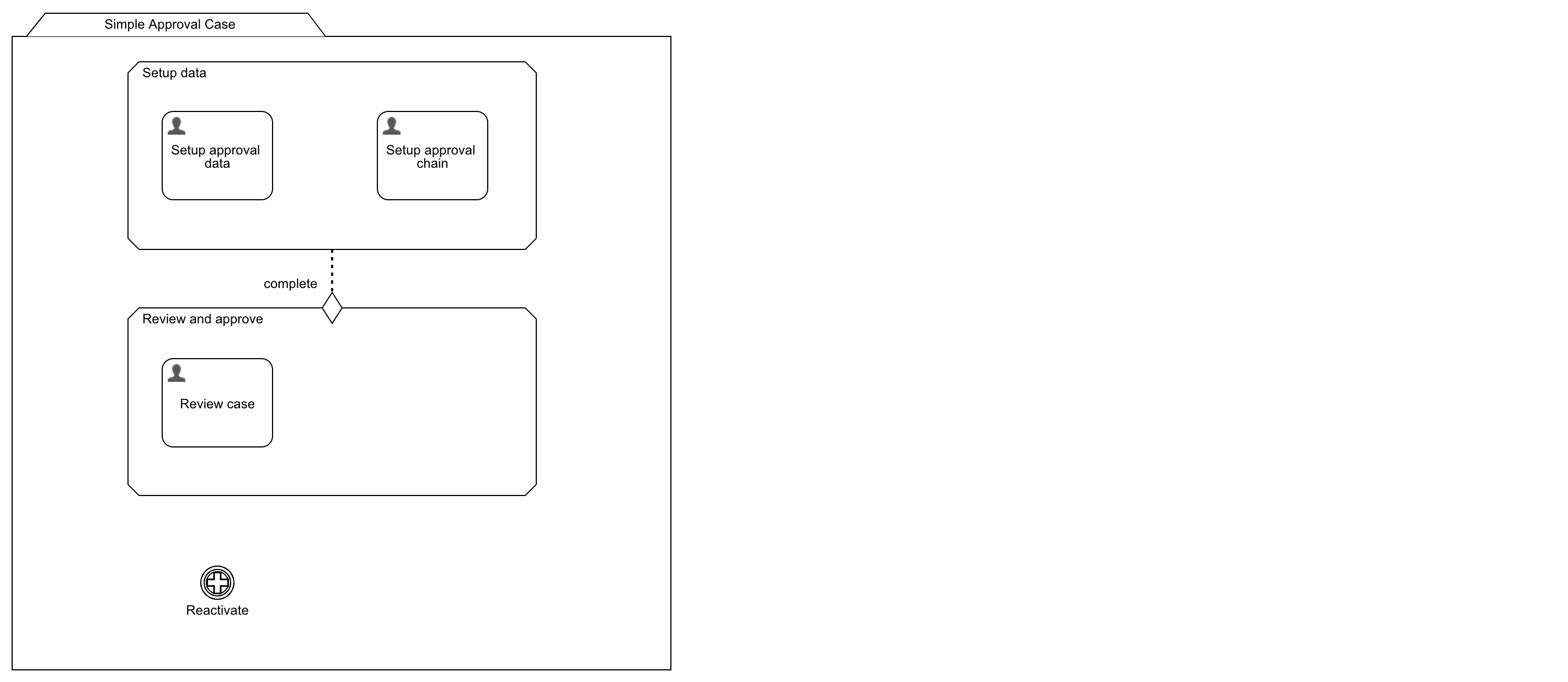
When we simply add the reactivate listener to the case model and don't define anything else, the case behaves exactly the same as if it was newly created when you reactivate it — both tasks in the setup stage become active and once completed, the review and approve stage is activated. The only difference to a new case is the fact that all existing data is preserved.
noteThe reactivate listener is marked automatically as to be ignored for parent completion, so it doesn't affect regular case completion.
Initialize Additional Data
Add an initialization plan item to the reactivate listener which gets triggered in phase one of the reactivation where you can reset or reinitialize the data as needed.
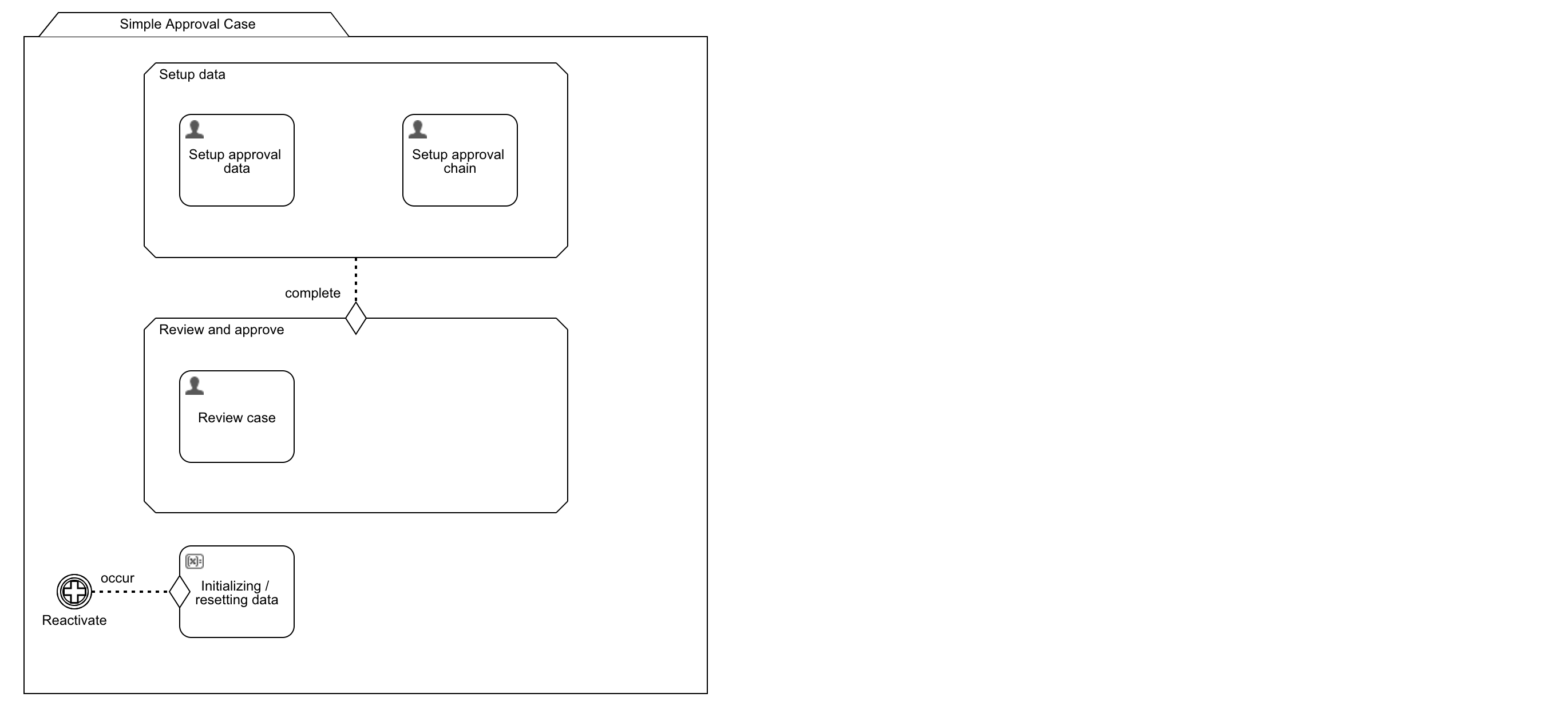

 caution
Everything which is triggered on case reactivation only and not as part of the regular case needs to be ignored for parent completion. Otherwise the case will be prevented from completing.
Ignore a Plan Item
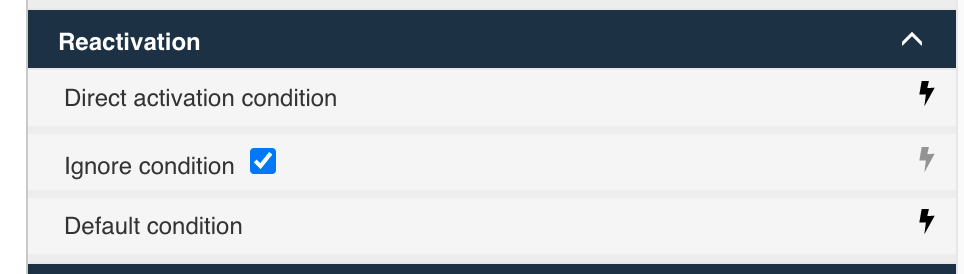
To reset the approval chain and redo the approval stage but not change any case data, check the ignore condition on the reactivation ruleset of the setup data task:
Reactivate a Particular Stage
To only re-execute the Review and approve stage: ignore the first stage and set the direct activation condition on the second stage. This circumvents the entry sentry so the review stage starts immediately upon reactivation.
Using Expressions for Dynamic Behavior
Leave it up to the person reactivating the case to choose from options like:
- Redo everything, optionally with resetting the data
- Redefine the approval chain and redo the approvals
- Only redo the approvals, based on existing data
Create a start form for the reactivate listener:
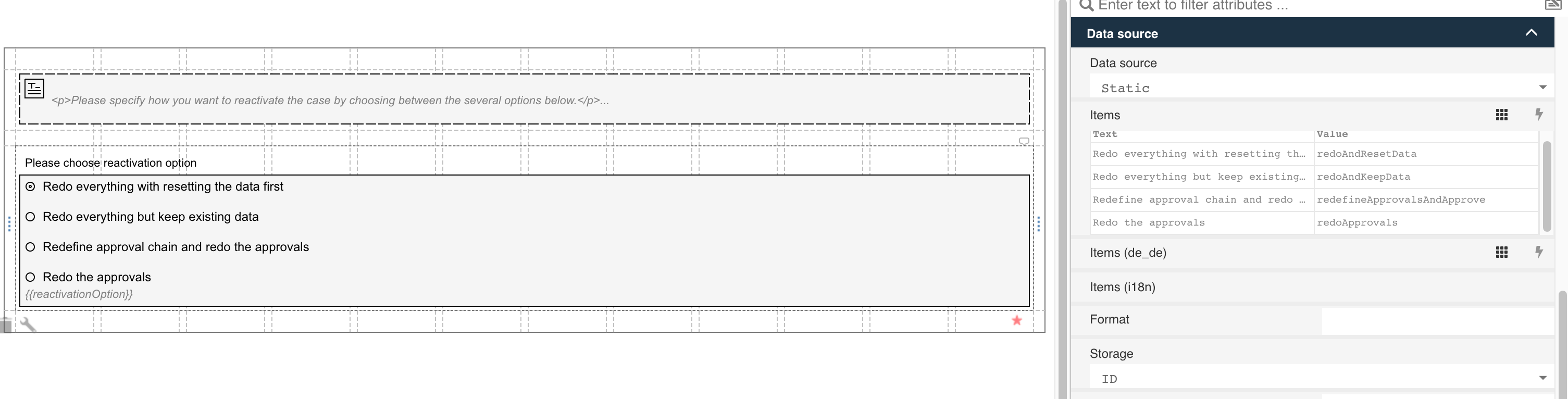
The chosen option is stored in a variable named reactivationOption. Then use expressions in the reactivation rules, for example:
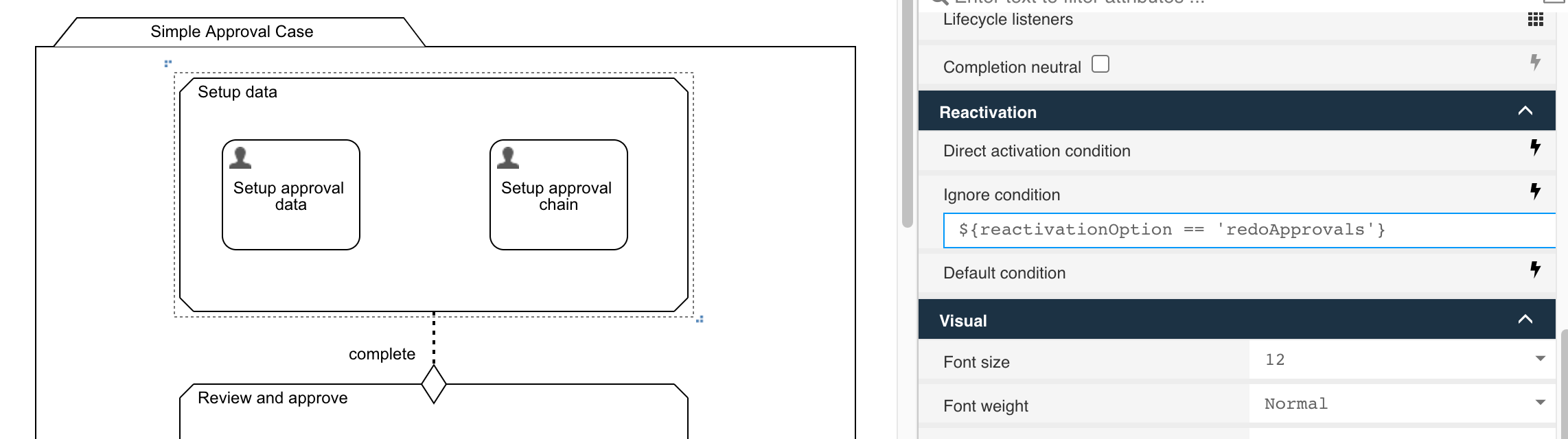
For the first stage, set the ignore condition to ${reactivationOption == 'redoApprovals'} to skip it for option 4:
For the second stage, set direct activation to ${reactivationOption == 'redoApprovals'} and default condition to ${reactivationOption != 'redoApprovals'}:

For individual plan items within a stage, add further conditions as needed:

A small reactivation process can handle data initialization for the various options:
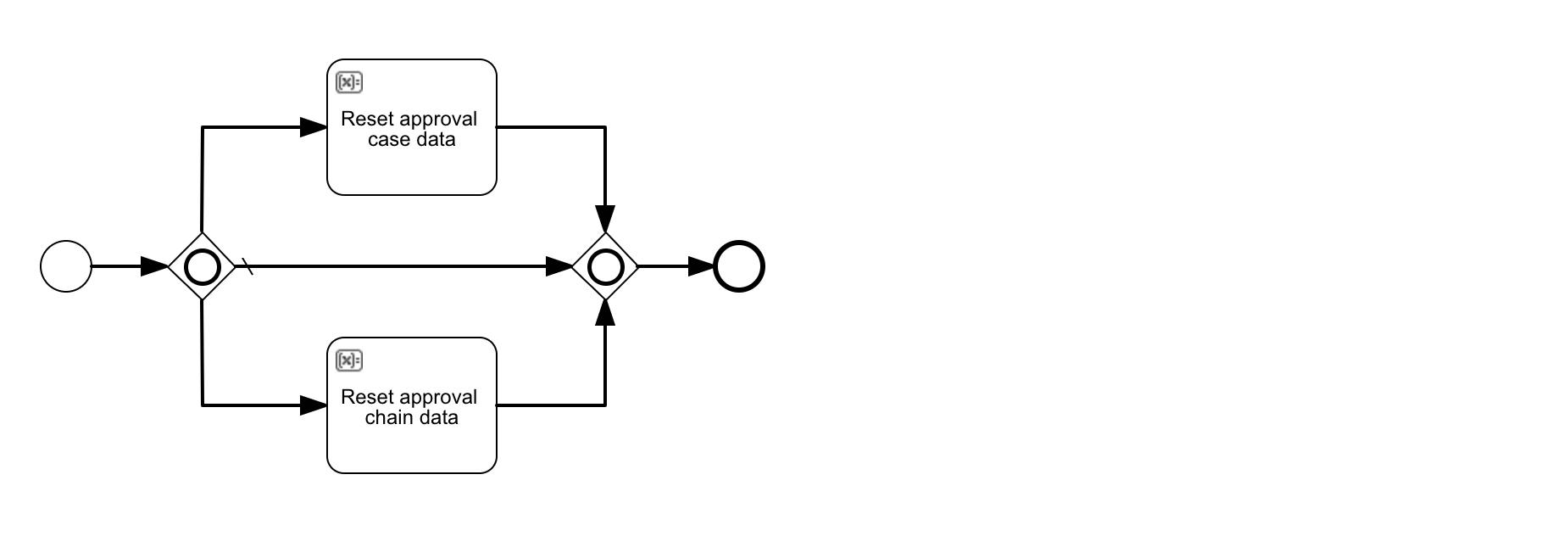
noteDon't add user tasks to phase one of the reactivation unless you have initialized all necessary data from phase two before. Phase one ends when there is nothing more to execute as directly dependant plan items connected to the reactivate listener. If there is a user task, execution stops and then phase two is executed, so anything you need from the user having an impact on case reactivation, get it within the start form and not in a user task during phase one.
Best Practices
- Start with the basic question: what should be your default? Ignore and explicitly mark the plan items needed for reactivation? Or the opposite?
- According to your answer, set the
Default reactivationconditions in the reactivate event listener accordingly to eitherIgnoreorDefault. - If necessary, add a service task or small reactivation process task and connect it directly with the reactivate event listener through an entry sentry. In here, change data as needed and prepare the case instance before it actually gets reactivated.
- Mark all those directly connected plan items as
Impact on parent completion: Ignoreto make sure they don't have an impact on the regular case model. - Do NOT use waiting states (e.g. user tasks) inside the plan items executed in phase 1 of the reactivation.
- Don't connect regular stages and other plan items directly with the reactivate event listener, unless they are explicitly and exclusively meant for reactivation only.
- Once this initial reactivation modeling is done, go through all your stages and plan items and define their reactivation rules and conditions accordingly.
Properties
General
| Attribute | Type | Description | Category |
|---|---|---|---|
| Model Id | Text | Model Id identifies the element within the process model. | The model id, name and documentation properties can be found on any element. They are used respectively to uniquely identify the event listener, to give it a user-friendly name and to add a free-form description. |
| Name | Text | The name of the element. This is the name displayed in the diagram. | |
| Documentation | MarkdownMinimal | The documentation attribute additionally adds a description to the component. | |
| Start form | Reference | An optional form shown when the event listener is manually activated. | A form that is shown when the reactivation is triggered. It can be used to gather data that afterwards can be used during the reactivation of the case instance. |
| Reactivation available for duration | ComplexTrigger | Defines the time period that the reactivation listener will be available after the case instance is completed. | When the capability for reactivation of a finished case instance is needed, this is often limited in time. Often this is based on regulatory rules that for example state the case instance should be allowed to reactivate under certain conditions for a certain number of years. The time is counted from the moment that the case instance finished. |
Security
| Attribute | Type | Description | Category |
|---|---|---|---|
| Permission users | User Selection | Define the users which have access to the user event listener. | Not every user should be able to reactive a case instance that is finished. The Permission users* and Permission groups can be used to configure which particular users should have access to this capability. |
| Permission groups | Group Selection | Define the groups which have access to the user event listener. |
Advanced
Details
| Attribute | Type | Description | Category |
|---|---|---|---|
| Available condition | Text | Sets an available condition, which is an expression that moves the event listener into the available state after creation if true. Also returns the event listener back to the unavailable state when the condition becomes false again. | The life cycle of event listeners is simpler than that of plan items such as human tasks: an event listener stays in the available state until the event happens. There’s no active state like for other plan items. In some use cases however, the event listener shouldn’t be available for the user to interact with unless a certain condition is true, typically based on case instance variables. The available condition serves exactly that purpose. |
| Include in history | Boolean | When the history level is set to "instance" or "task" level with this property it can be configured if this plan item instance should be included in the historic plan item instance data. | The Include in history flag can be used to store the historical entry of this event listener when running with a history level that normally would not store details of its execution. Note that this flag has no effect when running with history level 'none'. |
Listeners
| Attribute | Type | Description | Category |
|---|---|---|---|
| Lifecycle listeners | List | Allows you to define lifecycle listeners for a plan item. Lifecycle listeners allow you to execute an expression, a delegate expression or a class when a plan item transitions from one state to another. | With lifecycle listeners it is possible to react to state changes of the event listener instance. Lifecycle listeners allow you to execute an expression, a delegate expression or a class when the plan model transitions from one state to another. |
Visual
| Attribute | Type | Description | Category |
|---|---|---|---|
| Font size | Selection:
| The font size of the element in the diagram. | Visual properties that determine how the event listener is shown in the diagram. This has no impact on the runtime execution. |
| Font weight | Selection:
| The font weight of the element in the diagram. | |
| Font style | Selection:
| The font style of the element in the diagram. | |
| Font color | Color | The font color of the element in the diagram. | |
| Background color | Color | The background color of the element in the diagram. | |
| Border color | Color | The border color of the element in the diagram. |
List Attribute Details
Reactivation available for duration
| Attribute | Type | Description |
|---|---|---|
| timeduration | Text | |
| technical | Text |
Lifecycle listeners
| Attribute | Type | Description |
|---|---|---|
| Source state | Selection:
| |
| Target state | Selection:
| |
| Class | Text | Fully qualified classname of a class to be invoked when executing the task. The class must implement either PlanItemJavaDelegate or CmmnActivityBehavior. |
| Expression | Text | JUEL Expression to be executed when the task is started. Expressions allow you to interact with the backend by calling services, making calculations etc. You can find more information about expressions in the documentation. |
| Delegate expression | Text |