Evaluator Agent
An evaluator agent is a specialized agent type that acts as a quality judge, grading the output of another agent and returning a pass/fail verdict and a score that are recorded for observability and testing.
 When to use
Use an evaluator agent when you need LLM-based quality grading that goes beyond simple rules, such as judging correctness, tone, helpfulness, or faithfulness to source material. For deterministic checks (minimum length, allowed vocabulary, format validation), use a delegate expression evaluator instead. To delegate scoring to an external quality API, use a service registry evaluator.
Evaluators only measure quality, to block or reject content, use a guardrail agent.
Creating an Evaluator Agent
To create an evaluator agent:
- Create a new AI agent model
- Set the Agent type to Evaluator agent
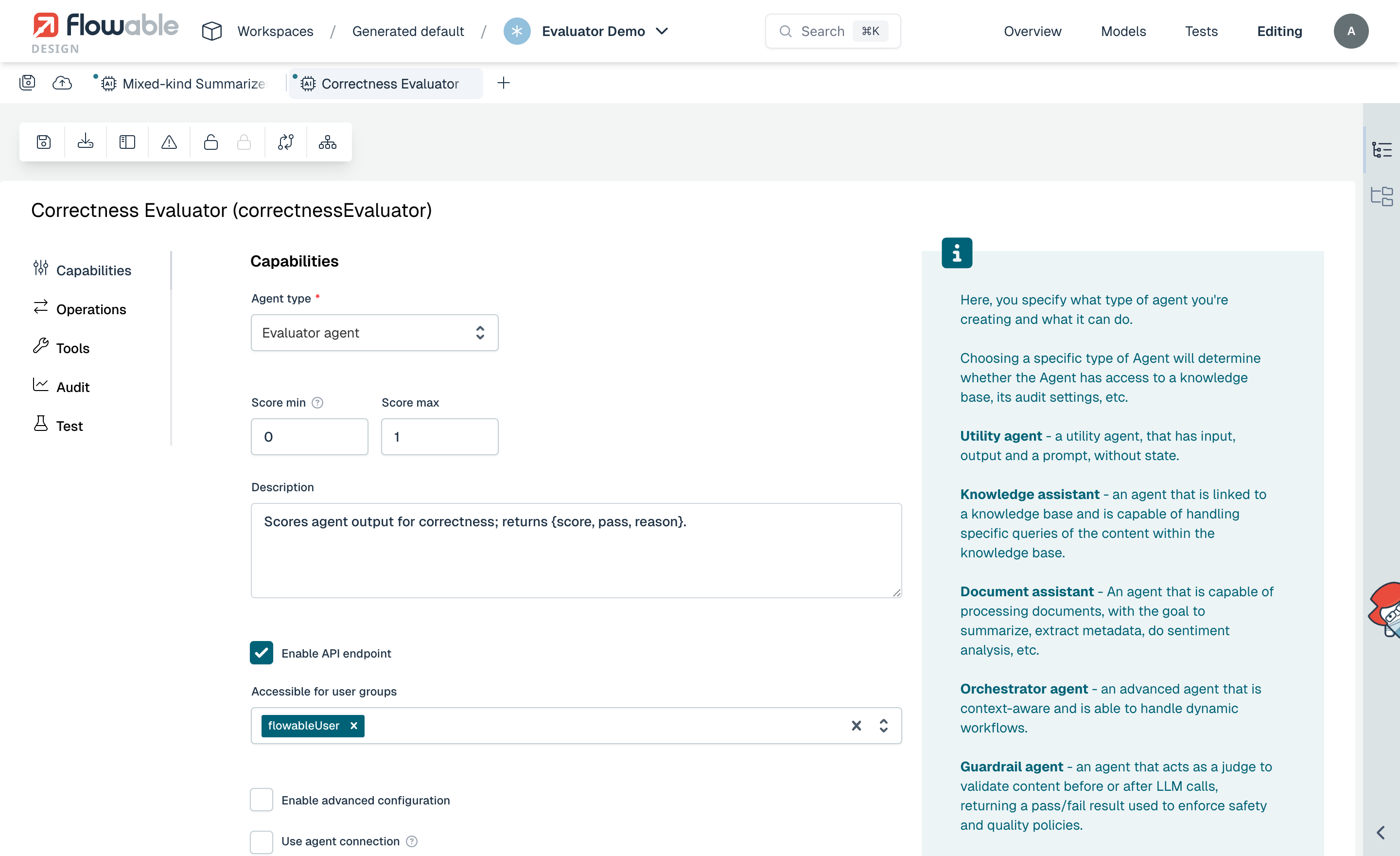
When the evaluator agent type is selected, the agent is configured with a simplified set of options and a pre-defined Evaluate operation. The Model Settings tab is available to configure which LLM model the evaluator agent uses.
The Evaluate Operation
The evaluator agent comes with a pre-defined Evaluate operation (key: evaluate).
This operation receives the content to grade and returns a structured JSON response.
Expected Input
When the evaluator runs, Flowable automatically provides the transcript of the invocation being scored as three input variables:
| Variable | Description |
|---|---|
output | The output produced by the evaluated agent. |
userPrompt | The user prompt that produced the output. |
systemPrompt | The system prompt of the evaluated operation. |
These are populated automatically; you do not need to map them. Reference them in the prompt using expressions such as ${output}.
Score Range
An evaluator agent has a score range with a minimum and maximum, configured on the agent and defaulting to 0.0 to 1.0. The range is used to interpret the score the judge returns and to flag out-of-range results.
There is no pass threshold. The judge decides the passed verdict itself, based on the criteria in its prompt. If you want "pass when the score is at least 0.7", state that rule in the prompt; Flowable does not derive passed from the score.
Expected Output
Flowable automatically configures the evaluate operation with a structured output schema. The LLM returns a JSON response with the following fields:
| Field | Type | Description |
|---|---|---|
passed | boolean | true if the output meets the quality criteria, false otherwise. |
score | number | The quality score, interpreted on the configured score range. |
reason | string | An explanation of why the output passed or failed. |
You do not need to configure this output schema yourself or instruct the LLM to return JSON in your prompt. Flowable handles this automatically.
Configuring the Prompt
The prompt of the evaluate operation should instruct the LLM on what to grade and how to decide a pass. For example:
You are a correctness evaluator. Compare the agent's output against the user's request and judge whether it is factually accurate and complete.
Score from 0.0 (completely wrong) to 1.0 (fully correct and complete).
Set "passed" to true only when the score is at least 0.7.
Briefly explain your reasoning in "reason".

Output to evaluate:
${output}
Since the evaluator agent invokes an LLM for every evaluation, consider using a smaller, faster model in the agent's Model Settings to minimize latency and cost. Because evaluations run asynchronously, their latency does not affect the response time of the agent being graded.
Using an Evaluator Agent in Another Agent
To use an evaluator agent, add it as an evaluator in another agent's operation:
- Open the operation editor of the agent whose quality you want to measure
- Go to the Evaluators tab
- Click Add evaluator
- Select Evaluator agent as the type
- Select your evaluator agent model
- Select the Operation to run on the evaluator agent
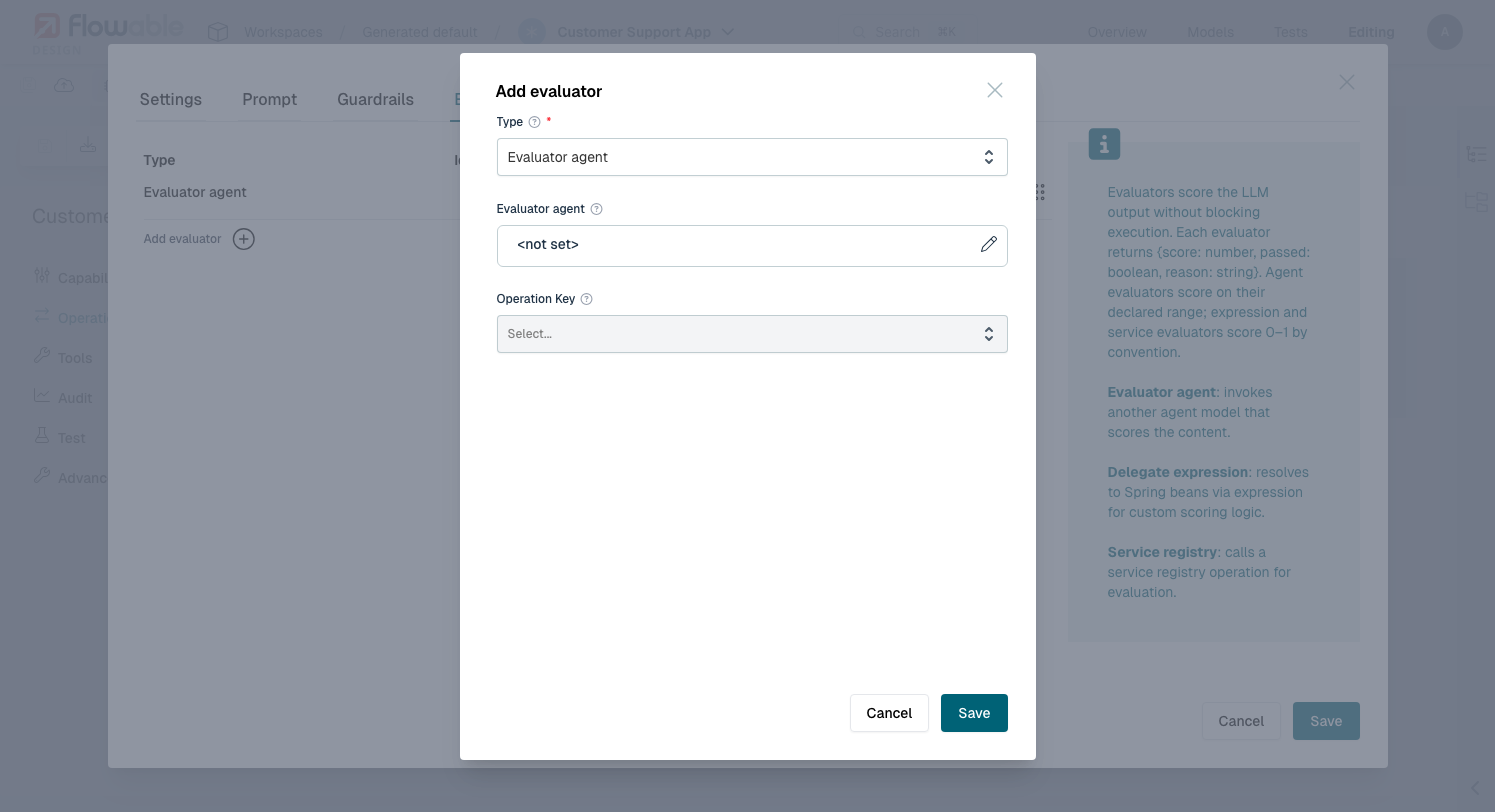
You can add several evaluators to the same operation, mixing evaluator agents with service and delegate expression evaluators, to grade the output along multiple dimensions at once.
See Also
- Evaluators: full overview of evaluator kinds, scoring and outcomes, and dashboard metrics
- Evaluators Example: end-to-end walkthrough of adding evaluators of each kind to an agent
- Guardrail Agent: the enforcement counterpart, which blocks rather than scores
- Auditing: how evaluations are recorded