Evaluators
Evaluators score the quality of an AI agent's output, giving you a continuous, measurable signal of how well your agents perform in production.
An evaluator runs after the agent has produced its answer, grades that answer against criteria you define, and records the verdict and score. It never changes or delays what the agent returned to the caller. Unlike guardrails, evaluators never block, skip, or reject a request; they only measure. This makes them the right tool for tracking quality, catching regressions, and powering dashboards.
Examples of what evaluators can measure:
- Correctness: Does the answer accurately reflect the input or source material?
- Tone and style: Is the response polite, professional, and on-brand?
- Faithfulness: Is the answer grounded in the provided context, or did the model hallucinate?
- Format and length: Does the output satisfy structural rules (minimum length, required fields, allowed vocabulary)?
Flowable supports three kinds of evaluator:
- Evaluator agents: Use an LLM-based agent to judge the output. Best for nuanced, context-dependent grading such as correctness, tone, or faithfulness.
- Service registry evaluators: Call an external service operation to score the output. Good for deterministic or third-party scoring, configurable entirely in Flowable Design.
- Delegate expression evaluators: Invoke a custom Spring bean for full programmatic scoring logic.
An operation can combine several evaluators of different kinds. Each one runs independently and records its own score, so you can grade the same output along multiple dimensions at once.
Overview
Evaluators run after an agent operation has finished and its result has been recorded. They run asynchronously in the background, scoring the captured transcript: the agent's output together with the system and user prompts that produced it. They run outside of the process or case that invoked the agent. Because of this, an evaluator can never delay or alter the response the caller already received. A process or case does not wait for an evaluation, and the verdict of an evaluator does not change the path of the process or case. Evaluators monitor agent executions over a long period and are not part of the runtime workflow.
The following turns are not evaluated:
- Invocations that were blocked by a guardrail. If a guardrail skipped or rejected the turn, there is no genuine agent output to score.
- The evaluator agents and guardrail agents themselves.
Every other invocation of an operation that has evaluators configured is scored, and each evaluator produces one recorded result per invocation.
Configuring Evaluators
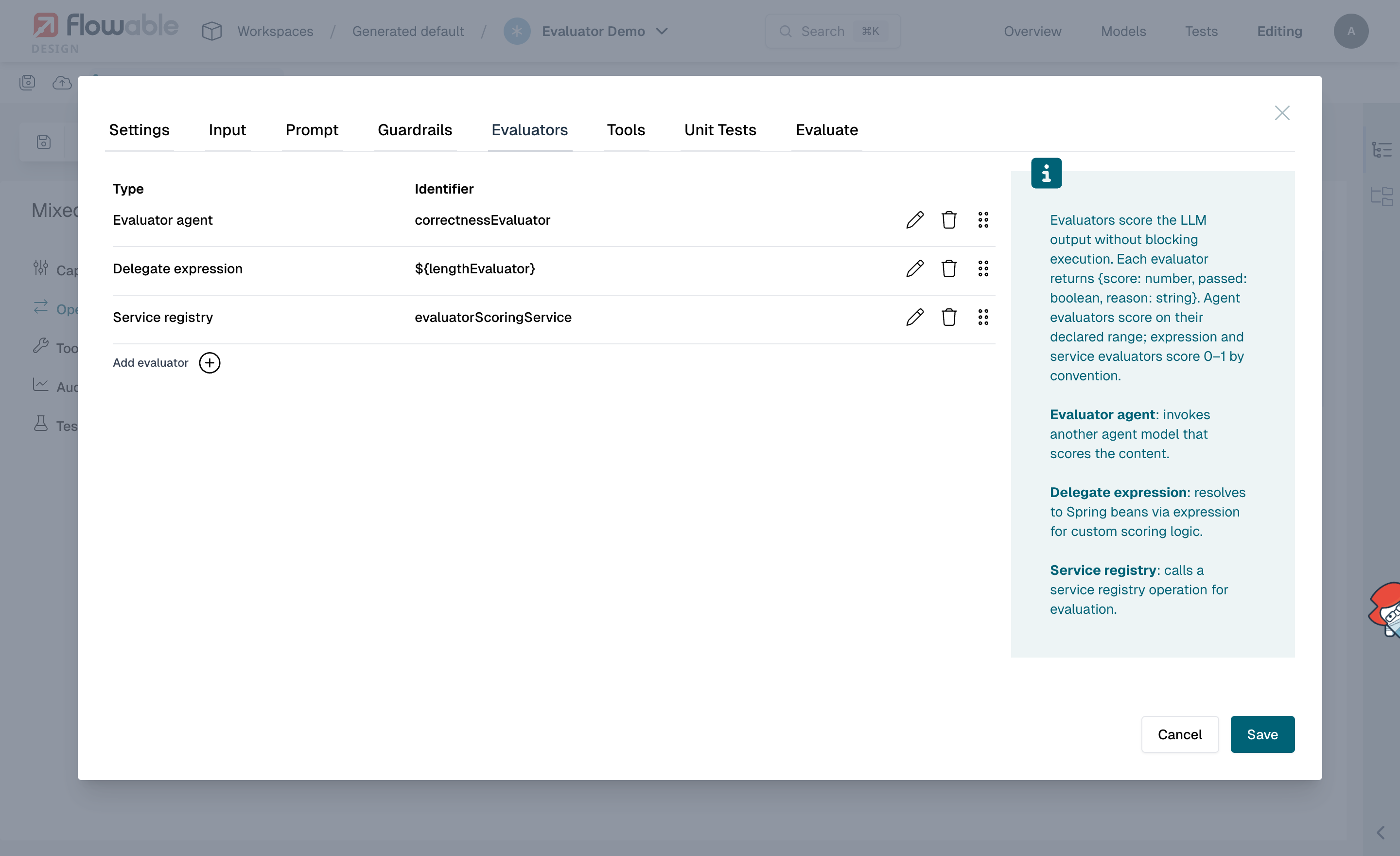
Evaluators are configured per operation in the Evaluators tab of the operation editor. Each evaluator references a judge (an agent, a service, or a Spring bean) and produces a pass/fail verdict and an optional score for every invocation.
To add an evaluator, click Add evaluator and choose a Type. The remaining fields depend on the type you select.
There are three types of evaluator:
Evaluator Agent
An evaluator agent references another agent model of the Evaluator agent type. This agent acts as a judge, using an LLM to grade the output against the criteria in its prompt.
When configuring an evaluator agent, you select an existing evaluator agent model from your app and the operation to run on it. At runtime, Flowable starts that operation, passing the original agent's output, userPrompt, and systemPrompt as context. The judge returns a structured result with a passed verdict, an optional score, and a reason.
The score is interpreted on the score range configured on the judge agent (see Evaluator Agent), which defaults to 0.0 to 1.0. There is no global pass threshold: the judge itself decides passed based on the criteria in its prompt.
Service Registry
A service evaluator calls a registered service model via the Flowable Service Registry. This is a good fit for deterministic scoring or for delegating to a third-party quality API, and it can be configured entirely in Flowable Design without writing Java code.
When configuring a service evaluator, you select:
- Service Model: a service model registered in the Service Registry
- Operation Key: the operation to invoke on the service
The service operation must follow a fixed contract:
| Parameter | Direction | Type | Required | Description |
|---|---|---|---|---|
output | input | string | yes | The agent output to score. Populated automatically by Flowable. |
userPrompt | input | string | no | The user prompt that produced the output. Populated automatically. |
systemPrompt | input | string | no | The system prompt of the evaluated operation. Populated automatically. |
passed | output | boolean | yes | true if the output meets the quality criteria, false otherwise. |
score | output | number | no | A numeric quality score. By convention on a 0 to 1 scale. Recorded as-is. |
reason | output | string | no | Explanation of the verdict. |
Any service that follows this contract can be used as an evaluator, including REST APIs, script services, or custom connectors. See the evaluators example for a step-by-step walkthrough.
Delegate Expression
A delegate expression evaluator uses a Spring bean expression (for example, ${lengthEvaluator}) to invoke custom Java-based scoring logic. This is useful when scoring requires deterministic, programmatic rules that don't warrant an LLM call or an external service, such as checking output length, validating a format, or computing a similarity metric.
The expression must resolve to a Spring bean that implements the ExternalEvaluatorInvoker interface. See the evaluators example for a complete bean implementation.
Scoring and Outcomes
Each evaluator run records the following for a single invocation:
- passed: the verdict, decided by the evaluator itself. There is no Flowable-side threshold; an evaluator agent decides
passedfrom its prompt, a service returnspasseddirectly, and a delegate bean returns it programmatically. - score: an optional numeric quality score. The score is recorded raw and never clamped.
- score range (
scoreMin/scoreMax): the expected bounds of the score, used to interpret it. Evaluator agents carry an explicit range (default0.0to1.0). Service and delegate expression evaluators have no enforced range and score on a0to1scale by convention. - reason: a human-readable explanation of the verdict.
An evaluation's verdict is simply passed (passed = true) or failed (passed = false), shown in the UI and available in tests alongside the score and reason.
When a recorded score falls outside the configured range, the result is flagged as out of range (scoreOutOfRange) rather than being adjusted. This surfaces misconfigured judges, for instance an evaluator agent that returns 9 on a 0 to 1 scale, without silently discarding the raw value. The recommended fix is to align the judge's prompt with the configured range.
Handling Errors and Failures
Because evaluators run after the invocation has completed, an evaluator's verdict has no effect on the agent's execution or on the response already returned to the caller.
- A failing evaluator records
passed = falsewith its score and reason. The agent output is unchanged. A judge that cannot reach a clear verdict (for example, an LLM that returns no decision) is recorded the same way: a failure with an explanatory reason. - An evaluator that hits an unrecoverable error (such as a service that stays unreachable) fails its background job. The job is retried according to the engine's async-job settings, and if it keeps failing it is moved to a dead-letter job for inspection, without ever affecting the parent invocation.
To act on a quality problem, use the recorded results downstream: report on the dashboard, alert on a drop in pass rate, or gate a release on test outcomes.
Auditing
Every evaluation is recorded in the agent invocation history, including failed ones. Each recorded result contains the evaluator, its kind and operation, the pass/fail verdict, the score and its range, and the reason.
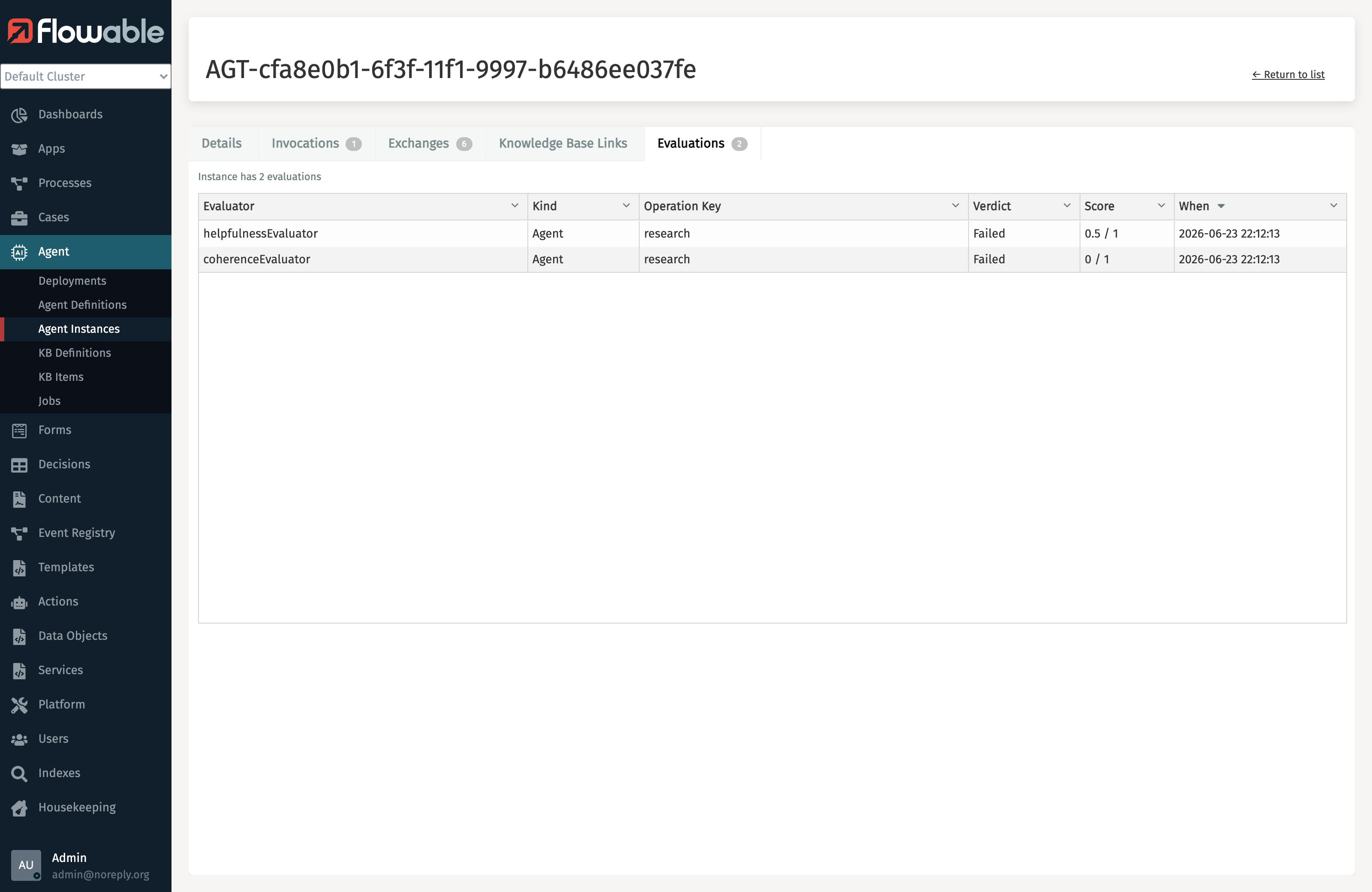
Evaluations are surfaced on the agent instance details page, under the Evaluations tab, in both Flowable Control (on-premise) and Flowable Hub (cloud). Each row shows the evaluator, its kind, the verdict (running, passed, or failed), the score, and when it ran; opening a row reveals the full reason and score range.
In Flowable Control (on-premise):
In Flowable Hub (cloud):
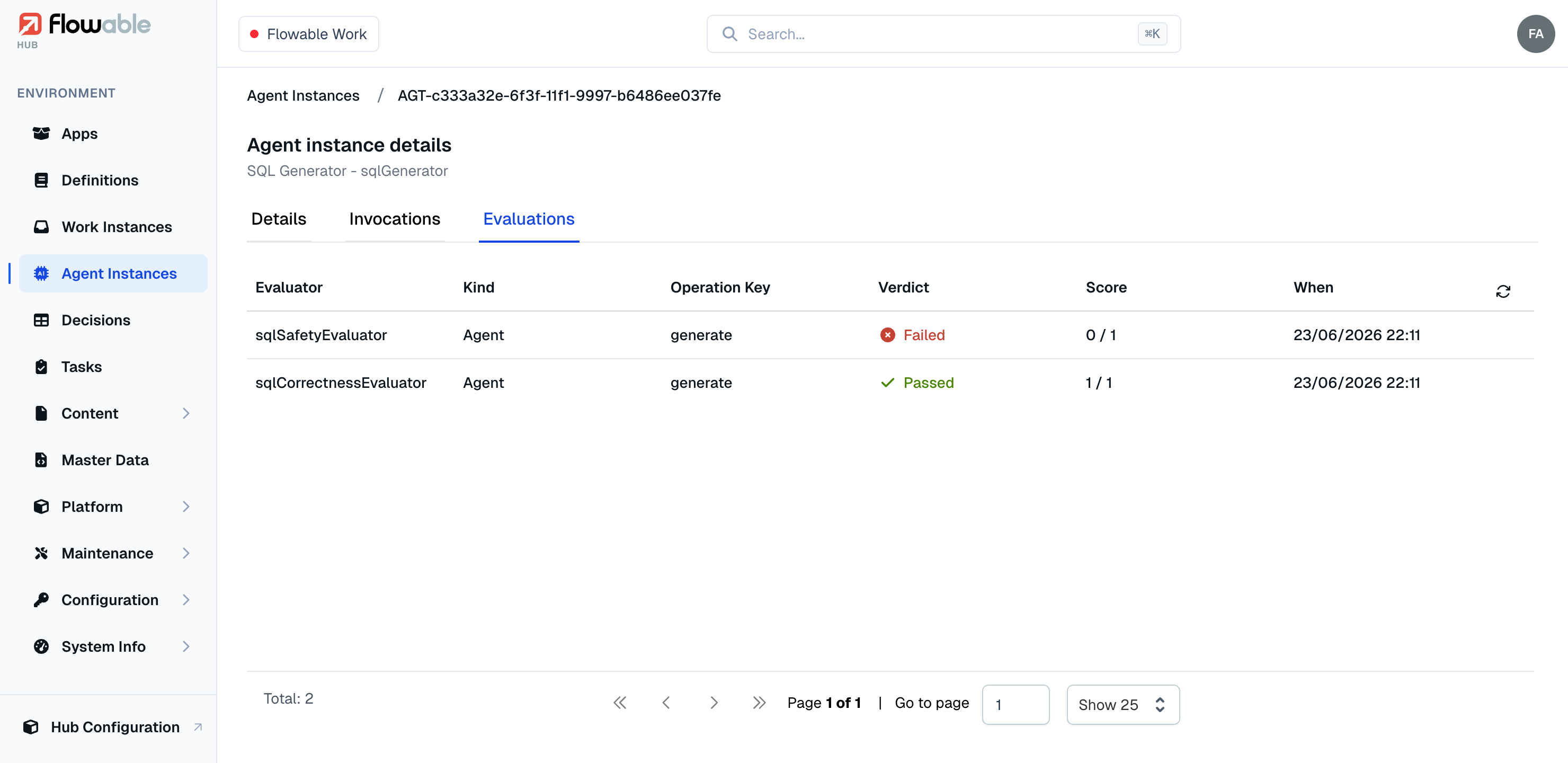
See Auditing for more information on agent audit logging.
Dashboard metrics
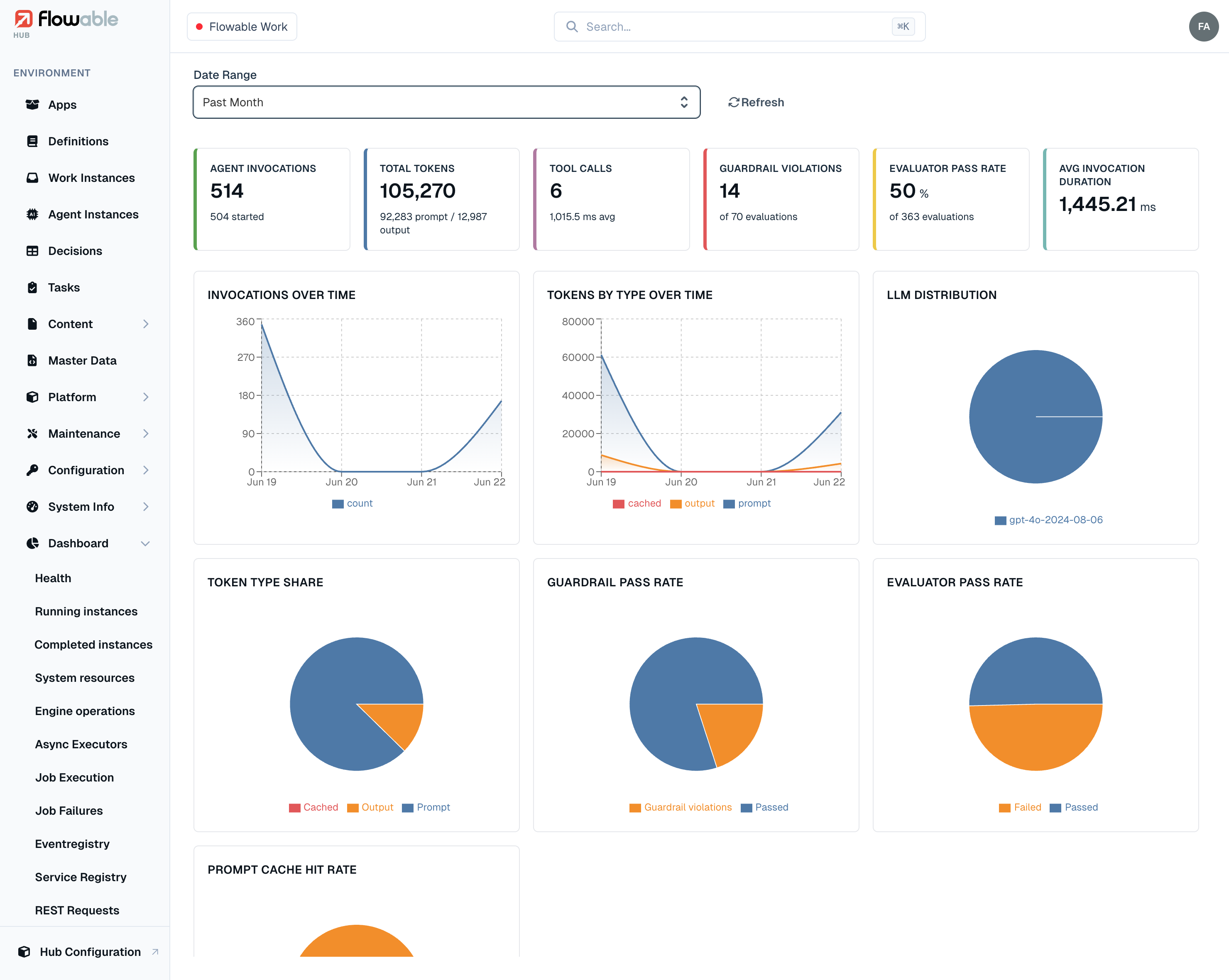
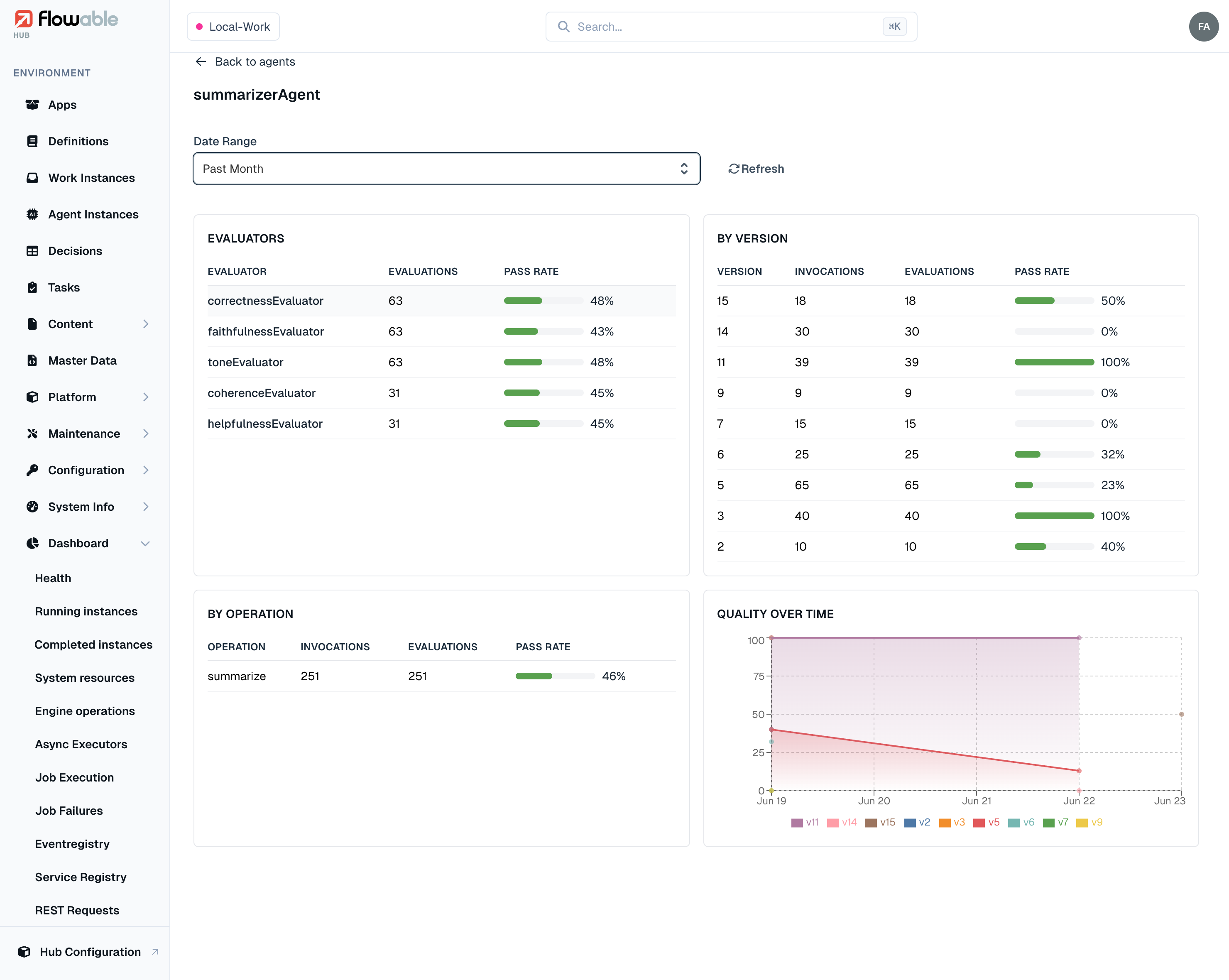
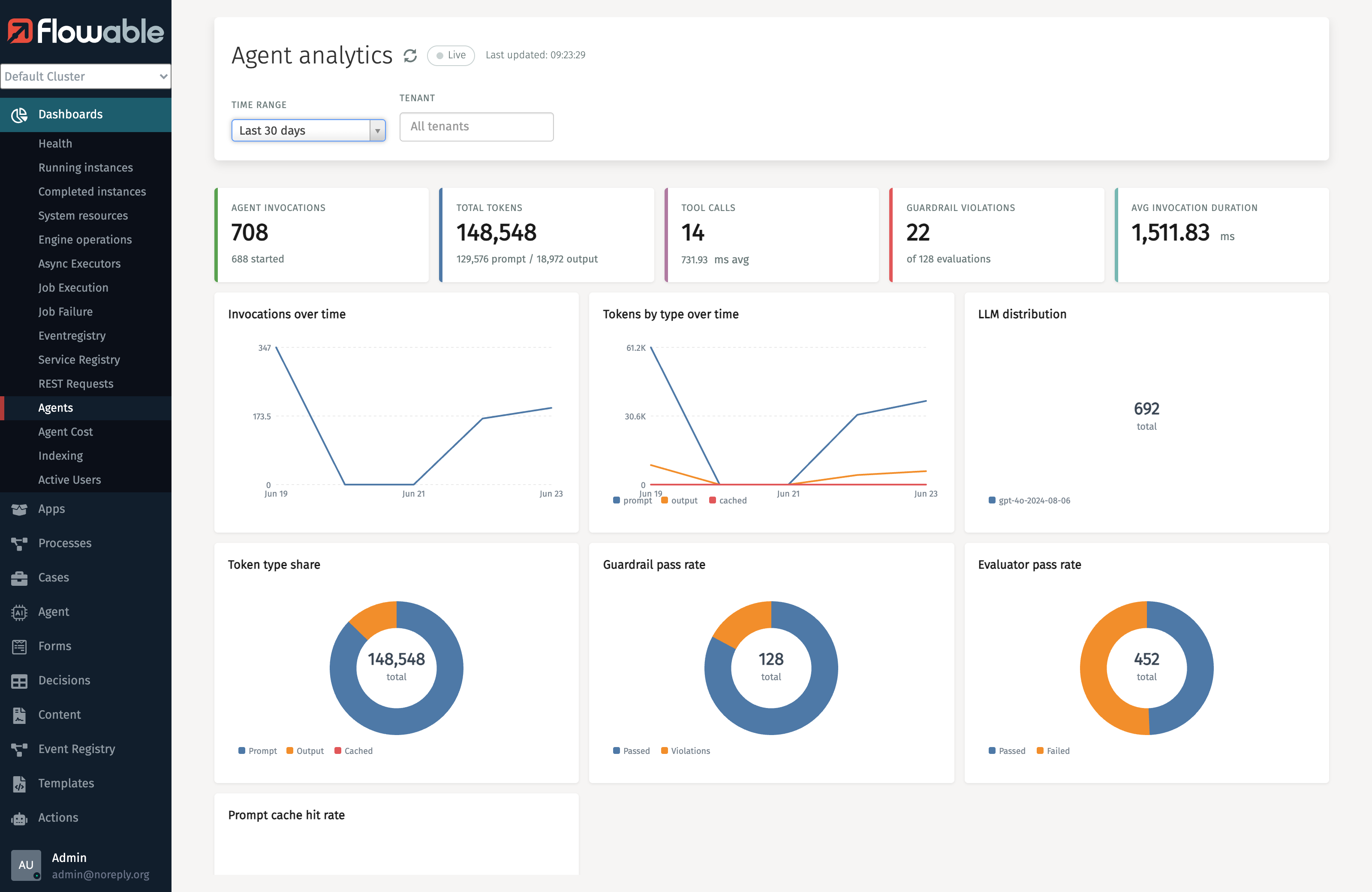
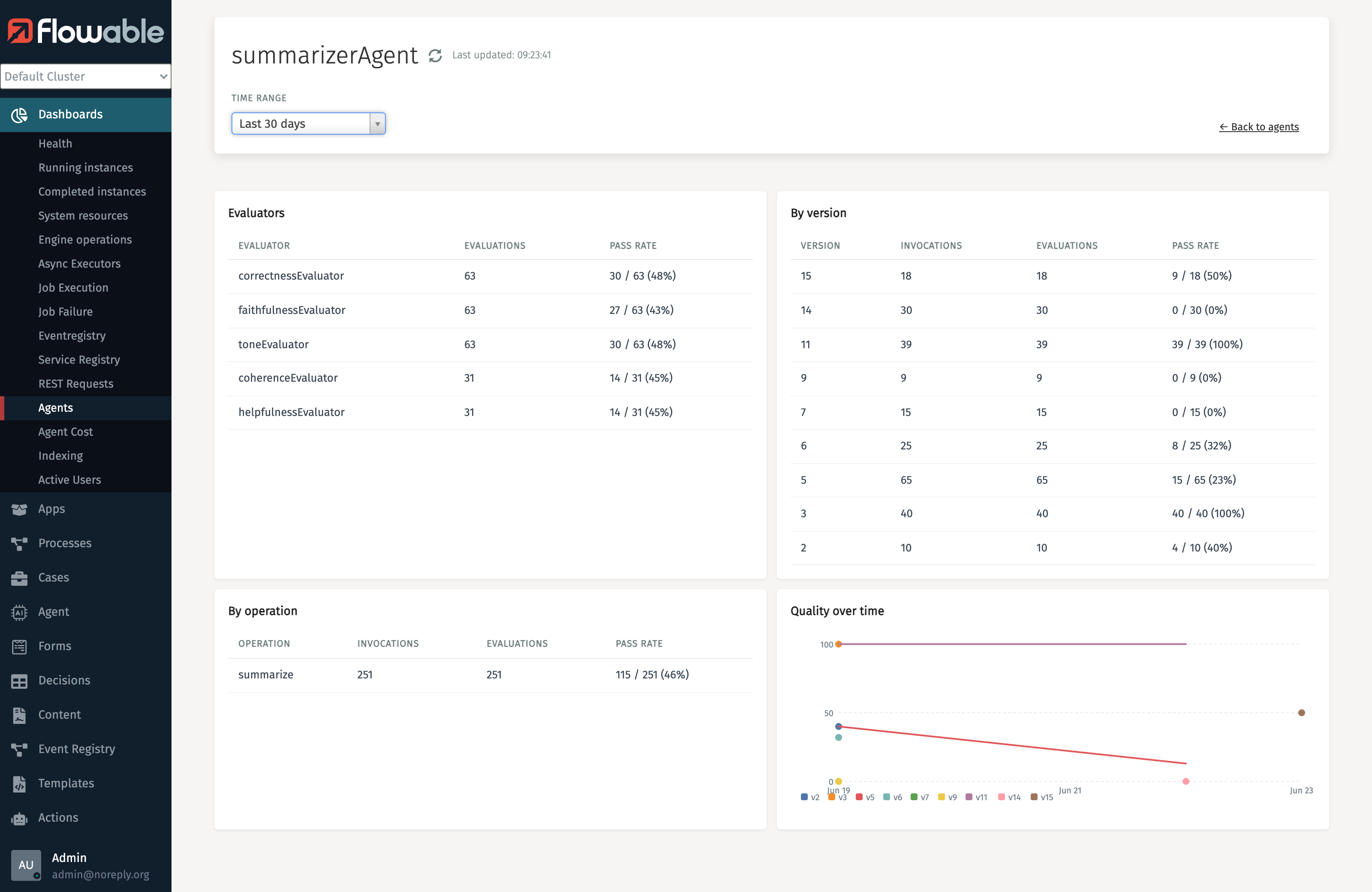
The agent overview dashboard surfaces an evaluator pass rate metric, the share of evaluations that passed, alongside the other agent metrics (invocations, tokens, guardrail pass rate, and so on). It gives a fleet-wide view of how often your agents' output meets the configured quality criteria. Drilling into a single agent breaks that pass rate down per evaluator, per operation, and per agent definition version, and plots it over time, so you can see which dimension is weakest or whether a new version regressed.
The same dashboard is available in both Flowable Control (on-premise) and Flowable Hub (cloud).
In Flowable Control (on-premise):
In Flowable Hub (cloud):